

Introduction
Most UI bugs live in the rendered 90% that source linters never see. Spacing drift, off-scale type, near-miss alignment, and touch targets that almost pass all show up after the browser computes the page.
Plumb is a deterministic design-system linter for rendered websites. It opens a page in a headless browser at multiple viewports, measures the computed DOM against a declared spec, and emits structured, pixel-precise violations that an AI coding agent can act on without guessing.
Where ESLint checks source code, Plumb checks the output your users actually get.
What Plumb is for
Plumb fits the gap between source linting and screenshot diffing.
- Source linters such as ESLint and stylelint catch problems in the code you wrote.
- Visual regression tools catch that a screenshot changed.
- Plumb checks the computed DOM and tells you which design-system rule broke, where it broke, and by how much.
That makes it useful in CI, local debugging, and agent workflows where a machine-readable violation is more useful than a red screenshot.
Two entry points
- CLI (
plumb lint <url>) for developers and CI. - MCP server (
plumb mcp) for AI coding agents (Claude Code, Cursor, Codex, Windsurf) via the Model Context Protocol.
Both share the same rule engine. The outputs match byte-for-byte across runs. Determinism is a hard guarantee.
Demo
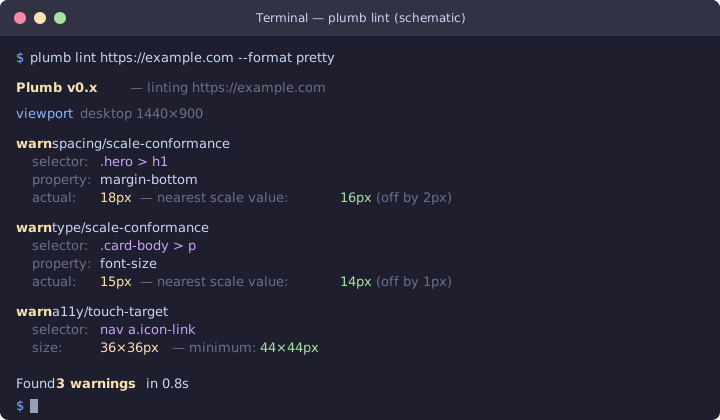
Run plumb lint against any URL. Plumb opens it in a headless browser,
measures every element against your design-system spec, and reports
pixel-precise violations:
Try it yourself — the live docs are a handy public target:
plumb lint https://plumb.aramhammoudeh.com
Install and try it
Pick the channel that fits your workflow:
- Install script (macOS / Linux / Windows) — one-line curl/irm
cargo install— if you already have a Rust toolchain- Homebrew —
brew install aram-devdocs/plumb/plumb - npm —
npm i -g plumb-cli - Build from source — for hacking on Plumb itself
Then continue with the docs for your workflow:
- Quick start for the first local run
- Configuration for the
plumb.tomlreference - CLI for commands, flags, and exit codes
- MCP server for agent setup
- Rules for the catalog
- GitHub Code Scanning for SARIF in CI
- reviewdog for PR feedback in CI