

Introduction
Most UI bugs live in the rendered 90% that source linters never see. Spacing drift, off-scale type, near-miss alignment, and touch targets that almost pass all show up after the browser computes the page.
Plumb is a deterministic design-system linter for rendered websites. It opens a page in a headless browser at multiple viewports, measures the computed DOM against a declared spec, and emits structured, pixel-precise violations that an AI coding agent can act on without guessing.
Where ESLint checks source code, Plumb checks the output your users actually get.
What Plumb is for
Plumb fits the gap between source linting and screenshot diffing.
- Source linters such as ESLint and stylelint catch problems in the code you wrote.
- Visual regression tools catch that a screenshot changed.
- Plumb checks the computed DOM and tells you which design-system rule broke, where it broke, and by how much.
That makes it useful in CI, local debugging, and agent workflows where a machine-readable violation is more useful than a red screenshot.
Two entry points
- CLI (
plumb lint <url>) for developers and CI. - MCP server (
plumb mcp) for AI coding agents (Claude Code, Cursor, Codex, Windsurf) via the Model Context Protocol.
Both share the same rule engine. The outputs match byte-for-byte across runs. Determinism is a hard guarantee.
Demo
Run plumb lint against any URL. Plumb opens it in a headless browser,
measures every element against your design-system spec, and reports
pixel-precise violations:
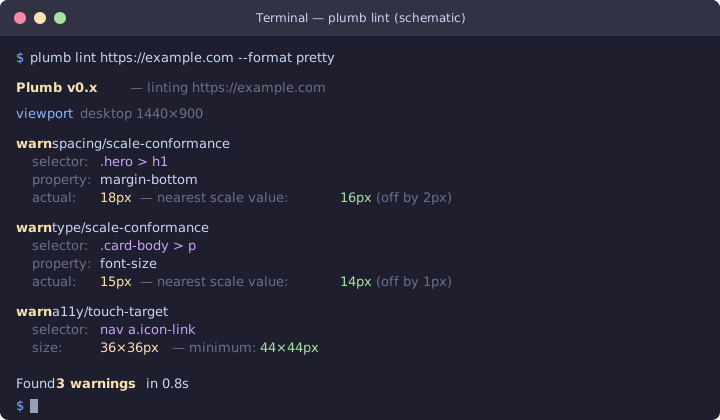
Try it yourself — the live docs are a handy public target:
plumb lint https://plumb.aramhammoudeh.com
Install and try it
Pick the channel that fits your workflow:
- Install script (macOS / Linux / Windows) — one-line curl/irm
cargo install— if you already have a Rust toolchain- Homebrew —
brew install aram-devdocs/plumb/plumb - npm —
npm i -g plumb-cli - Build from source — for hacking on Plumb itself
Then continue with the docs for your workflow:
- Quick start for the first local run
- Configuration for the
plumb.tomlreference - CLI for commands, flags, and exit codes
- MCP server for agent setup
- Rules for the catalog
- GitHub Code Scanning for SARIF in CI
- reviewdog for PR feedback in CI
Install
Plumb ships as a single binary. Pick the channel that matches your shell.
| Channel | Best for |
|---|---|
| Install script | macOS / Linux / Windows users who want one-line install |
cargo install | Rust developers already on cargo |
| Homebrew tap | macOS / Linux Homebrew users |
npm i -g | Node-tooling shops that already pin CLI tools through npm |
| Build from source | Contributors hacking on Plumb itself |
After install, run plumb --version to confirm. Then point yourself at
the Quick start.
Install script (macOS / Linux / Windows)
The script picks the right archive for your platform, verifies the
attestation, and drops the binary on your PATH.
macOS and Linux:
curl -LsSf https://plumb.aramhammoudeh.com/install.sh | sh
Windows (PowerShell):
irm https://plumb.aramhammoudeh.com/install.ps1 | iex
Windows note: the PowerShell installer relies on the GitHub Actions build attestation for integrity. It does not verify the published
.sha256sidecar — that gap is in upstreamcargo-distand is tracked for follow-up. If you want belt-and-braces verification, download the archive and rungh attestation verify(see Verify release attestations).
If you want to read the script first, fetch it without piping to
sh:
curl -LsSf https://plumb.aramhammoudeh.com/install.sh -o plumb-install.sh
less plumb-install.sh
sh plumb-install.sh
The script is generated by cargo dist; the source lives in
dist-workspace.toml in this repo.
Cargo
If you already have a Rust toolchain (1.95 or newer):
cargo install plumb-cli
This builds from source against the version published to crates.io.
Pin a version with --version:
cargo install plumb-cli --version 0.0.11
Homebrew
For macOS or Linuxbrew:
brew install aram-devdocs/plumb/plumb
The tap repository is aram-devdocs/homebrew-plumb. The formula tracks the
latest tagged release.
Intel Mac users: V0 ships native binaries for Apple Silicon (aarch64) only. Install via
cargo install plumb-cliinstead. Native Intel binaries return when the upstream cargo-dist runner pool stabilizes (#269).
npm
If your project already pins CLI tools through npm:
npm i -g plumb-cli
The npm package is unscoped and wraps the same prebuilt binary that the install script and Homebrew formula download. The install script that ships inside the package verifies the platform archive’s checksum before extracting it.
Build from source
Use this path if you’re hacking on Plumb. You need:
git clone https://github.com/aram-devdocs/plumb
cd plumb
just setup            # installs the cargo / nextest / hooks tooling
just build-release    # produces target/release/plumb
The binary lands at target/release/plumb. Add it to your PATH, or
symlink it:
ln -s "$(pwd)/target/release/plumb" /usr/local/bin/plumb
plumb --version
To run without installing:
cargo run --quiet -p plumb-cli -- lint plumb-fake://hello
Browser dependency
Real plumb lint <url> runs need Chrome or Chromium. Plumb does not
bundle a browser. See Install Chromium for
the platform notes and the supported version range.
If you only want to try the rule engine without a browser, the
plumb-fake://hello URL scheme returns a canned snapshot you can
lint locally.
Verify the installation
plumb --version
plumb lint plumb-fake://hello
The first command prints the version. The second runs the rule engine against the canned fake snapshot — no browser required. If both work, move on to the Quick start.
Verify release attestations
Every release artifact ships with an SLSA L2 provenance attestation
generated by GitHub Actions via
actions/attest-build-provenance.
This lets you confirm that the binary you downloaded was built from
the source in this repository, on the expected CI runner, without
tampering.
Quick check
Install the GitHub CLI (gh), then:
gh attestation verify plumb-cli-x86_64-unknown-linux-gnu.tar.xz \
  --repo aram-devdocs/plumb
Replace the filename with whichever archive you downloaded. The command prints “Verification succeeded!” and exits 0 if the attestation is valid.
What gets attested
| Artifact kind | Attested? |
|---|---|
Platform archives (plumb-cli-<target>.tar.xz, .zip) | Yes |
Installer scripts (plumb-cli-installer.sh, plumb-cli-installer.ps1) | Yes |
Homebrew formula (plumb-cli.rb) | Yes |
npm package (plumb-cli-npm-package.tar.gz) | Yes |
The attestation binds each file’s SHA-256 digest to the GitHub Actions
workflow run that produced it. Bundles are stored in GitHub’s
attestation API and indexed by digest — there is no list endpoint, so
gh attestation verify (or the by-digest API) is the only public read
path. Programmatic access:
gh attestation verify plumb-cli-x86_64-unknown-linux-gnu.tar.xz \
  --repo aram-devdocs/plumb \
  --format json | jq '.[0].verificationResult.statement'
Offline verification
GitHub attestations are stored in the GitHub attestation API, not as release assets. To verify offline, first download the bundle while you have network access:
gh attestation download plumb-cli-x86_64-unknown-linux-gnu.tar.xz \
  --repo aram-devdocs/plumb
This writes the bundle to sha256:<digest>.jsonl in the current
directory (the filename is fixed by gh; on Windows the colon becomes
a dash). Verify offline with the same gh binary:
gh attestation verify plumb-cli-x86_64-unknown-linux-gnu.tar.xz \
  --bundle 'sha256:<digest>.jsonl' \
  --repo aram-devdocs/plumb
If you prefer cosign, the
JSONL file holds one sigstore bundle per line; pass a single-bundle
file via cosign verify-blob --bundle ….
Quick start
Five minutes from a fresh checkout to your first violation. This page assumes you already followed the Install page (or are running from a source build) and have Chrome or Chromium installed for the real-URL step.
1. Sanity-check the binary
plumb --version
plumb lint plumb-fake://hello
plumb-fake://hello is a built-in canned snapshot. It runs without a
browser and proves the rule engine works.
2. Drop a starter config
plumb init
This writes a plumb.toml in the current directory. The starter file
includes the three default viewports (mobile, tablet, desktop),
a 4-pixel spacing grid, a typographic scale, a small color palette,
and the touch-target spec.
The same file is checked into the repo at
examples/plumb.toml.
Compare against it whenever the schema changes.
3. Lint a real URL
plumb lint https://example.com
By default this snapshots the page at every viewport in
plumb.toml and prints pretty output. The exit code tells you what
happened:
| Code | Meaning |
|---|---|
| 0 | No violations at or above --min-severity (default warn). |
| 1 | One or more violations at or above the --min-severity threshold. |
| 2 | CLI or infrastructure failure (bad URL, missing config, browser not found). |
If Chrome is not on the standard path, point at it explicitly:
plumb lint https://example.com \
  --executable-path "/Applications/Google Chrome.app/Contents/MacOS/Google Chrome"
See Install Chromium for platform-specific paths and the supported version range.
4. Switch to JSON when you wire it into CI
plumb lint https://example.com --format json > violations.json
The JSON output is byte-identical across runs given the same snapshot,
config, and rule set. That property is what makes Plumb safe to diff
in CI — there is no clock or hash-randomized output to wash through
jq.
For SARIF (GitHub code scanning, JetBrains, etc.):
plumb lint https://example.com --format sarif --output plumb.sarif
5. Configure a rule
Tighten one rule and disable another. Add this to plumb.toml:
[rules."spacing/grid-conformance"]
severity = "error"   # promote from warning to error

[rules."edge/near-alignment"]
enabled = false       # silence this rule entirely
Re-run the lint. The exit code now flips to 1 when
spacing/grid-conformance fires, and edge/near-alignment no longer
shows up.
The full set of knobs lives in Configuration. Per-rule details live under Rules — each rule documents the config it reads.
6. Hook into your editor
If your editor speaks JSON Schema (VS Code, JetBrains, Helix), generate the canonical schema and point the editor at the local file:
plumb schema > plumb.schema.json
// .vscode/settings.json
{
  "evenBetterToml.schema.associations": {
    "plumb.toml": "./plumb.schema.json"
  }
}
You get hover docs, completion, and inline validation.
7. Wire it to your AI coding agent
plumb mcp
plumb mcp runs the Model Context Protocol server on stdio. See
MCP server for the agent config snippets and the tool
list.
What’s next
- Configuration — the full
plumb.tomlreference. - CLI — every flag and subcommand.
- Rules — per-rule docs.
- MCP server — JSON-RPC surface and tool list.
Install Chromium
Plumb drives Chrome or Chromium through the Chrome DevTools Protocol. The
browser is not bundled with the plumb binary.
Plumb supports Chromium major versions 131 through 150 inclusive. If the
detected browser reports a major version outside that range, plumb lint
exits with an unsupported Chromium error instead of producing lint
output.
macOS
Install Chrome or Chromium:
brew install --cask google-chrome
Plumb checks common app locations such as:
/Applications/Google Chrome.app/Contents/MacOS/Google Chrome
/Applications/Chromium.app/Contents/MacOS/Chromium
To use a specific binary:
plumb lint https://example.com --executable-path "/Applications/Google Chrome.app/Contents/MacOS/Google Chrome"
Linux
Install Chromium from your distribution packages:
sudo apt-get update
sudo apt-get install chromium
Package names vary by distribution. On Debian or Ubuntu systems the binary
is usually chromium, chromium-browser, or google-chrome-stable.
To use a specific binary:
plumb lint https://example.com --executable-path /usr/bin/chromium
Windows
Install Chrome from the official installer, or install Chromium with a package manager you already use. Plumb checks the standard Chrome app registration and common install paths.
To use a specific binary:
plumb lint https://example.com --executable-path "C:\Program Files\Google\Chrome\Application\chrome.exe"
Check the version
Run the browser directly to confirm its major version:
chromium --version
The first number in the version must fall in the supported range
(131 through 150 inclusive). If you have several Chrome or Chromium
builds installed, pass --executable-path to select one whose major
version falls in that range.
Auto-fetch (opt-in)
If you do not have a system Chromium installed, pass
--auto-fetch-chromium and Plumb downloads Chrome-for-Testing into a
managed cache directory before the first lint run. Subsequent runs
reuse the cached binary.
plumb lint https://example.com --auto-fetch-chromium
The cache directory follows the platform convention:
| Platform | Cache directory |
|---|---|
| Linux | $XDG_CACHE_HOME/plumb/chromium, falling back to ~/.cache/plumb/chromium |
| macOS | ~/Library/Caches/plumb/chromium |
| Windows | %LOCALAPPDATA%\plumb\chromium |
After the first install, Plumb writes a .plumb-sha256 file alongside
the executable. Every subsequent run re-hashes the binary and refuses
to launch on a mismatch — the cache is pinned against accidental or
malicious tampering.
Trust model
Auto-fetch downloads and executes a third-party binary. Chromium is
served by Google over HTTPS but Plumb does not verify the upstream
publisher signature, so passing --auto-fetch-chromium is your
explicit acknowledgement of trust. The SHA-256 sidecar protects against
post-install tampering, not against a compromised upstream. If the
trust model is unacceptable for your environment, install Chromium
yourself and pass --executable-path instead.
CLI
The plumb binary is the primary entry point for developers and CI.
Subcommands
plumb lint <url>
Lint a URL. The plumb-fake://hello URL scheme is still available for
local smoke tests. Real URLs require a Chrome or Chromium binary whose
major version falls in Plumb’s supported range (see
Install Chromium).
| Flag | Description |
|---|---|
-c, --config <path> | Config file path. Defaults to plumb.toml in CWD. |
--executable-path <path> | Chrome or Chromium binary to use instead of auto-detection. |
--format <pretty|json|sarif> | Output format. Default: pretty. |
--min-severity <info|warn|error|off> | Lowest severity to show and count toward the exit code. Default: warn. off shows nothing and exits 0. |
--rule <id> | Show only violations from this rule id. Repeatable. Unknown ids match nothing. |
--max-findings <n> | Cap the rendered findings after filtering and sorting. Pretty adds a footer; JSON sets a truncated flag while summary keeps the full count. |
--output <path> | Write rendered output to a file instead of stdout. |
-v, --verbose | Increase log verbosity. -vv for trace. |
--viewport <name> | Restrict the run to the named viewport. Repeatable. |
--selector <css> | Restrict linting to a CSS subtree. |
--wait-for <css> | Wait for a selector to appear before capturing. |
--wait-ms <ms> | Sleep N ms after navigation (and after --wait-for). |
--cookie <name=value> | Pre-set a cookie before navigation. Repeatable. |
--header <name: value> | Add an extra HTTP header to every request. Repeatable. |
--auth-script <path> | Evaluate a .js file on every new document. Path MUST resolve under CWD. |
--storage-state <path> | Load a Playwright storage-state.json. |
--disable-animations [bool] | CSS animation/transition killer. Default true. |
--hide-scrollbars [bool] | CSS scrollbar killer. Default true. |
--dpr <factor> | Pin device-pixel ratio for Emulation.setDeviceMetricsOverride. |
--suggest-ignores | Append a suggested .plumbignore block. See --suggest-ignores. |
--auto-fetch-chromium | Download Chrome-for-Testing into Plumb’s cache when no --executable-path is given and no system Chromium is detected. See Install Chromium. |
Exit codes:
| Code | Meaning |
|---|---|
| 0 | No violations at or above --min-severity (default warn). |
| 1 | One or more violations at or above the --min-severity threshold. |
| 2 | CLI or infrastructure failure (bad URL, missing config, etc.). |
--min-severity (info < warn < error, default warn) sets the
threshold. The default hides info-severity violations from the output
and the exit code, so advisory checks (suggestions, low-confidence fixes)
never break CI on their own; run --min-severity info to surface them.
--min-severity off shows nothing and always exits 0. Use
[rules."<id>"] severity = "warning" to promote a specific advisory rule
into the default CI-failing tier.
plumb init
Write a starter plumb.toml to the current directory. Pass --force to
overwrite.
Pass --from <path> to bootstrap from an existing project tree. The
walker discovers CSS custom properties (:root { --token: value; }),
Tailwind config files, and DTCG token JSON, and folds them into a
starter config. Output is deterministic — two runs against the same
tree produce byte-identical files. Token names that don’t match a
known prefix (e.g. --space-*, --color-*, --radius-*) are skipped;
edit the file to fill the gaps.
plumb explain <rule-id>
Print the long-form documentation for a rule. The argument is a slash-
separated id like spacing/grid-conformance.
plumb schema
Emit the JSON Schema for plumb.toml on stdout. Redirect into a file
and point your editor at it for autocomplete:
plumb schema > plumb.schema.json
plumb mcp
Run the Model Context Protocol server on stdio. See MCP server.
plumb watch [<url>]
Re-run plumb lint whenever a file under the current directory (or
--path <dir>) changes. The first cycle runs immediately on startup so
you get a baseline; subsequent cycles fire after a 250 ms debounce
window collapses each burst of editor events into a single re-lint.
Press Ctrl-C to exit. The status line on stderr after every cycle records the cycle’s shape:
watching… changed: 3 files; lint: 2 violations; took 412 ms
Stdout carries the rendered lint output (pretty by default;
--format json and --format sarif work the same as lint), so you
can tail the watch output with the JSON consumer of your choice
without losing the status line.
Watch flags mirror plumb lint’s. One extra:
| Flag | Description |
|---|---|
--path <dir> | Directory to watch. Repeatable. Defaults to CWD. |
A .plumbignore file at the root of any watched directory excludes
paths whose substring matches any of its lines. Blank lines and lines
starting with # are ignored. The defaults already skip .git/,
target/, node_modules/, .idea/, and .vscode/.
--suggest-ignores
plumb lint --suggest-ignores appends a suggested .plumbignore block
after the normal lint output. The block lists one entry per
(rule_id, selector_path) tuple that would suppress every current
violation, sorted by (rule_id, selector_path) for byte-identical
output across runs.
The flag is opt-in. Default behavior is unchanged.
Why
Plumb is most useful on a brownfield codebase, but a 200-violation
first run is too noisy to action. --suggest-ignores produces a
ready-made starter ignore file: paste it into .plumbignore, fix the
violations as a follow-up, and remove entries one by one.
Pretty format
$ plumb lint plumb-fake://hello --suggest-ignores
desktop
  spacing/grid-conformance
    html > body
      warning: `html > body` has off-grid padding-top 13px; expected a multiple of 4px.
      ...

stats
  ...

Suggested .plumbignore (would suppress 1 violation):
# Format: <rule_id> <selector_path>
spacing/grid-conformance html > body
The footer prints after the existing stats block, separated by a
blank line.
JSON format
--format json --suggest-ignores adds a suggested_ignores array to
the existing envelope:
{
  "plumb_version": "0.0.x",
  "run_id": "sha256:…",
  "stats": { … },
  "suggested_ignores": [
    { "rule_id": "color/palette-conformance", "selector": "#cta" },
    { "rule_id": "spacing/grid-conformance", "selector": "html > body" }
  ],
  "summary": { … },
  "violations": [ … ]
}
Entries are sorted by (rule_id, selector). The run_id and
violations fields are unchanged — toggling --suggest-ignores MUST
NOT shift the run digest.
SARIF
The SARIF formatter ignores --suggest-ignores. SARIF 2.1.0 has no
canonical slot for ignore suggestions, and consumers (GitHub Code
Scanning, IDE plugins) parse the schema strictly. Use the JSON output
for tooling that wants the suggestions.
File format
The suggested footer follows a deliberately minimal grammar:
# Format: <rule_id> <selector_path>
spacing/grid-conformance .header
spacing/grid-conformance .footer .copyright
color/palette-conformance #cta-button
One entry per line, two whitespace-separated fields:
<rule_id>— slash-separated rule identifier (e.g.spacing/grid-conformance).<selector_path>— the CSS selector path Plumb attached to the violation.
Lines beginning with # are comments. Trailing whitespace is
insignificant.
MCP server
plumb mcp runs an MCP server on
stdio by default. AI coding agents (Claude Code, Cursor, Codex,
Windsurf) connect to it the same way they connect to any other MCP
server.
Configuring your agent
Point your agent at the plumb binary. In Claude Code’s .mcp.json:
{
  "mcpServers": {
    "plumb": {
      "command": "plumb",
      "args": ["mcp"]
    }
  }
}
For local development against a source checkout:
{
  "mcpServers": {
    "plumb": {
      "command": "cargo",
      "args": ["run", "--quiet", "-p", "plumb-cli", "--", "mcp"]
    }
  }
}
Transports
Stdio remains the default transport. Existing agent configs that invoke
plumb mcp without extra flags do not change.
Plumb also supports Streamable HTTP:
plumb mcp --transport http --port 4242
HTTP boot requires PLUMB_MCP_TOKEN to be set to a non-empty bearer
token. If the variable is missing or empty, plumb mcp --transport http refuses to boot.
Every HTTP request must send Authorization: Bearer <token>. Missing or
invalid tokens return 401 Unauthorized with
WWW-Authenticate: Bearer.
Keep the token private. Do not log it, paste it into chat, or commit it
to the repository. The HTTP server binds to 127.0.0.1 and logs the
bind address, not the token value.
Tools
| Tool | Description |
|---|---|
echo | Smoke-test the transport. Echoes the message arg back. |
lint_url | Lint a URL. Args: `{ “url”: “…”, “detail”: “compact” |
lint_page_html | Lint a self-contained HTML string by rendering it in the same Chromium as lint_url, loaded as a data: URL so embedded <style> blocks and inline style attributes produce real computed styles and geometry. Args: { "html": "...", "base_url": "https://example.com/", "working_dir"?: "/abs/path" }. External stylesheets and resources are not fetched — a relative <link> or <img> will not load, so use lint_url for a full page. Same aggregated compact response shape as lint_url. Hard-capped at 1 MiB of input and 10 000 elements, checked before rendering; oversized inputs surface as JSON-RPC invalid_params (-32602). When Chromium is unavailable the response carries isError: true with the driver error, never a misleading empty result. |
explain_rule | Return canonical documentation and metadata for a Plumb rule by id. Args: { "rule_id": "<category>/<id>" }. |
list_rules | List every built-in Plumb rule with id, default severity, and one-line summary. No args. |
get_config | Return resolved plumb.toml for a working directory as JSON. Memoized per (path, mtime). |
compare_viewports | Capture snapshots at 2+ viewports and return a deterministic diff: missing nodes, size changes above a pixel threshold, document-order reorderings, and computed-style differences. Args: { "url": "...", "viewports": [{ "name", "width", "height", "dpr" }, ...], "size_threshold_px"?: 4 }. 10 KB structuredContent budget; aggregate counts plus a capped diff list. Full reference: compare_viewports. |
Resources
| Resource | Description |
|---|---|
plumb://config | Return the resolved plumb.toml for the MCP server’s current working directory as JSON. The payload matches get_config’s structuredContent shape: `{ “config”: { … }, “source”: “file” |
The response shape follows the MCP content + structuredContent
convention:
{
  "content": [
    {
      "type": "text",
      "text": "warning spacing/grid-conformance ×1: `html > body` has off-grid padding-top 13px; …"
    }
  ],
  "isError": false,
  "structuredContent": {
    "by_rule": { "spacing/grid-conformance": 1 },
    "counts": { "error": 0, "info": 0, "total": 1, "warning": 1 },
    "findings": [
      {
        "rule_id": "spacing/grid-conformance",
        "severity": "warning",
        "message": "`html > body` has off-grid padding-top 13px; …",
        "instances": 1,
        "examples": ["html > body"],
        "fix": "Snap `padding-top` to the nearest spacing-grid value (12px).",
        "doc_url": "https://plumb.aramhammoudeh.com/rules/spacing-grid-conformance"
      }
    ],
    "truncated": false
  }
}
detail: "compact" returns the token-efficient payload shown above:
violations are grouped by rule and message shape into findings, each
with an instances count and up to three example selectors, so 600
identical low-contrast rows collapse to one entry instead of 600.
counts and by_rule always reflect every violation, and truncated
is true when groups were dropped to fit the 10 KB budget. detail: "full" keeps the same text block and switches structuredContent to
the canonical JSON envelope from plumb lint <url> --format json,
including plumb_version, run_id, stats, summary, and full
per-violation fields. Full mode is rejected when the serialized
structured payload exceeds 50 KB.
Common issues
These come up across every agent integration. Per-agent pages (Claude Code, Cursor, Codex) link here instead of repeating the list.
PATH resolution. Many agents launch the MCP server from a GUI
process that does not inherit your shell’s full PATH. macOS GUI apps
are the usual offender. If plumb is installed somewhere like
~/.cargo/bin and the agent reports “command not found”, use an
absolute path in the agent config:
{
  "mcpServers": {
    "plumb": {
      "command": "/Users/you/.cargo/bin/plumb",
      "args": ["mcp"]
    }
  }
}
For agents that register the server with a CLI (e.g. codex mcp add),
pass the absolute binary path the same way.
Working directory. The MCP server resolves plumb.toml from the
working directory where the agent launches it — usually the project
root. Place plumb.toml there, or call get_config with an explicit
path argument.
Large responses. lint_url defaults to detail: "compact", which
is the token-efficient payload. detail: "full" returns the canonical
--format json envelope and is hard-capped at 50 KB of
structuredContent; oversized responses are rejected with a JSON-RPC
error. For pages with many violations, stay on compact and request
full only for specific follow-ups.
Tool approval prompts. Some agents prompt on first MCP tool use. Accept the prompt to allow Plumb tools.
Sandboxed network access. Agents that run inside a sandbox (Codex
is one) may restrict outbound network. lint_url against a real URL
needs the sandbox to allow Chromium to reach the target host.
plumb-fake://hello works without network access and is useful for
verifying the tool chain end to end.
Claude Code
Claude Code connects to MCP servers through a .mcp.json file in
your project root or home directory. See the
MCP server reference for the full tool list and response
shapes.
Install the server
If you installed Plumb via cargo install plumb-cli, the plumb
binary is already on your PATH. If you built from source, make sure
the binary is accessible from the directory where Claude Code runs.
Configure .mcp.json
Create or edit .mcp.json in your project root:
{
  "mcpServers": {
    "plumb": {
      "command": "plumb",
      "args": ["mcp"]
    }
  }
}
For a source checkout (useful when hacking on Plumb itself):
{
  "mcpServers": {
    "plumb": {
      "command": "cargo",
      "args": ["run", "--quiet", "-p", "plumb-cli", "--", "mcp"]
    }
  }
}
Verify the connection
After saving .mcp.json, restart Claude Code or run /mcp in the
Claude Code prompt to list connected servers. You should see plumb
with its tools (lint_url, explain_rule, list_rules, get_config,
echo).
Run a quick smoke test by asking Claude Code:
Use plumb’s echo tool to send “hello”.
If the tool returns your message, the transport is working.
Lint a page
Ask Claude Code:
Use plumb to lint https://example.com
Claude Code calls lint_url and returns a compact summary of
violations. Use detail: "full" when you need the complete JSON
envelope (capped at 50 KB).
Common issues
PATH resolution, working directory, large responses, and tool approval prompts apply to every agent integration. See Common issues for the consolidated list.
The Claude-specific note: when plumb is not on the GUI-process
PATH, point .mcp.json at the absolute binary path (e.g.
/Users/you/.cargo/bin/plumb) rather than the bare plumb command.
See also
- MCP server reference — tool list, response shapes, resource URIs.
- Configuration —
plumb.tomlreference. - Install — binary installation options.
Cursor
Cursor supports MCP servers through its settings UI or a
.cursor/mcp.json file. See the
MCP server reference for the full tool list and response
shapes.
Install the server
Make sure the plumb binary is on your PATH. If you installed via
cargo install plumb-cli, it should already be available. If you built
from source, confirm with which plumb or where plumb on Windows.
Configure via .cursor/mcp.json
Create .cursor/mcp.json in your project root:
{
  "mcpServers": {
    "plumb": {
      "command": "plumb",
      "args": ["mcp"]
    }
  }
}
Alternatively, open Cursor Settings → Features → MCP Servers → Add
Server, then enter the command plumb with arguments mcp.
For a source checkout:
{
  "mcpServers": {
    "plumb": {
      "command": "cargo",
      "args": ["run", "--quiet", "-p", "plumb-cli", "--", "mcp"]
    }
  }
}
Verify the connection
After saving the config, restart Cursor or reload the MCP connection from Settings → Features → MCP Servers. The server should appear as connected with its tools listed.
Test the transport:
Use plumb’s echo tool to send “hello”.
Lint a page
Ask Cursor’s agent:
Use plumb to lint https://example.com
The agent calls lint_url and returns the violation summary. Request
detail: "full" for the complete JSON output.
Common issues
PATH resolution, working directory, large responses, and tool approval prompts apply to every agent integration. See Common issues for the consolidated list.
The Cursor-specific note: macOS GUI Cursor often launches with a
minimal PATH, so an absolute binary path in .cursor/mcp.json is
the most reliable fix. Cursor also prompts to approve MCP tool calls
on first use — accept the prompt to allow Plumb tools.
See also
- MCP server reference — tool list, response shapes, resource URIs.
- Configuration —
plumb.tomlreference. - Install — binary installation options.
Codex
OpenAI Codex manages MCP servers through the codex mcp CLI. See the
MCP server reference for the full tool list and response
shapes.
Install the server
Make sure the plumb binary is on your PATH. If you installed via
cargo install plumb-cli, it should already be available.
Register the server
Add Plumb as an MCP server:
codex mcp add plumb -- plumb mcp
For a source checkout (useful when hacking on Plumb itself):
codex mcp add plumb -- cargo run --quiet -p plumb-cli -- mcp
Confirm the registration:
codex mcp list
You should see plumb in the output.
Verify the connection
Start a new Codex session in the project directory. Codex picks up the registered server and makes its tools available.
Test the transport:
Use plumb’s echo tool to send “hello”.
Lint a page
Ask Codex:
Use plumb to lint https://example.com
Codex calls lint_url and returns the violation summary.
Common issues
PATH resolution, working directory, large responses, and sandboxed network access apply to every agent integration. See Common issues for the consolidated list.
The Codex-specific note: register the server with an absolute path
when the sandbox PATH does not include plumb:
codex mcp add plumb -- /home/you/.cargo/bin/plumb mcp
Codex sandboxes may also block outbound network. Use
plumb-fake://hello to verify the tool chain without granting
network access; only lint_url against a real host needs the
network allowance.
See also
- MCP server reference — tool list, response shapes, resource URIs.
- Configuration —
plumb.tomlreference. - Install — binary installation options.
compare_viewports
Capture snapshots at two-or-more viewports of the same URL and return a deterministic per-node delta. Useful for catching mobile/desktop regressions: nodes that disappear at the small breakpoint, blocks that reflow above the threshold, components that swap order, and tracked computed-style properties that diverge.
Arguments
{
  "url": "https://example.com/",
  "viewports": [
    { "name": "mobile",  "width": 375,  "height": 800, "dpr": 2.0 },
    { "name": "desktop", "width": 1280, "height": 800, "dpr": 1.0 }
  ],
  "size_threshold_px": 4
}
| Field | Type | Required | Description |
|---|---|---|---|
url | string | yes | URL to capture. Accepts http(s):// and plumb-fake://. |
viewports | array | yes | At least 2 viewports. The first is the diff baseline. |
viewports[].name | string | yes | Stable name. MUST be unique. |
viewports[].width | u32 | yes | Viewport width in CSS pixels. MUST be > 0. |
viewports[].height | u32 | yes | Viewport height in CSS pixels. MUST be > 0. |
viewports[].dpr | f32 | yes | Device pixel ratio. |
size_threshold_px | u32 | no | Pixel threshold for size-change diffs. Defaults to 4. |
Response
{
  "content": [
    {
      "type": "text",
      "text": "compare_viewports https://example.com/ across 2 viewports: 4 diff(s) [missing=1, size=2, reorder=0, style=1]"
    }
  ],
  "isError": false,
  "structuredContent": {
    "url": "https://example.com/",
    "viewports": ["mobile", "desktop"],
    "size_threshold_px": 4,
    "summary": {
      "total": 4,
      "missing": 1,
      "size_changes": 2,
      "reordered": 0,
      "style_changes": 1
    },
    "diffs": [
      {
        "kind": "missing",
        "selector": "html > body > nav",
        "present_in": ["desktop"],
        "absent_in": ["mobile"]
      },
      {
        "kind": "size_change",
        "selector": "html > body",
        "viewport_a": "mobile",
        "viewport_b": "desktop",
        "width_a": 375, "height_a": 800,
        "width_b": 1280, "height_b": 800,
        "delta_px": 905
      },
      {
        "kind": "style_change",
        "selector": "html > body > main",
        "property": "display",
        "viewport_a": "mobile",
        "viewport_b": "desktop",
        "value_a": "block",
        "value_b": "flex"
      }
    ],
    "truncated": false
  }
}
Diff kinds
kind | When emitted |
|---|---|
missing | A selector path exists in some viewports but not others. |
size_change | A node’s width or height changed by more than size_threshold_px pixels. |
reordered | A node’s dom_order differs across viewports. |
style_change | A tracked computed-style property differs. Tracked properties: display, flex-direction, grid-template-columns, font-size, color, background-color, visibility, position. |
Token budget
structuredContent is capped at 10 KB. Aggregation runs server-side:
the summary always reports the full counts, but the diffs array is
capped at 200 entries. When the cap fires, truncated is true. On the
rare path where serialized output exceeds 10 KB even after capping, the
diff list is dropped entirely and dropped_for_cap: true is set so the
caller can re-issue with a higher size_threshold_px.
Determinism
Three calls with the same arguments produce byte-identical
structuredContent. Diffs are sorted by (kind, selector, property, viewport_a, viewport_b) before serialization.
Errors
Returned as JSON-RPC -32602 on the response’s error field:
viewportsshorter than 2.- Duplicate
viewport.namevalues. - Empty
urlstring. - Any viewport with
width == 0orheight == 0.
Driver failures (Chromium not found, version out of range, navigation
error) return a successful response with isError: true and a single
text content block describing the error.
See also
- MCP server reference — single-viewport
lint_urland full tool list. - Configuration —
plumb.tomlreference.
Configuration
Plumb reads plumb.toml from the working directory by default. Pass
--config <path> to plumb lint to override. A starter file is
written by plumb init; the canonical example is
examples/plumb.toml
in the repo.
This page is the full reference. Every section is optional. When you
omit a section, Plumb uses that section’s defaults. Rules with usable
defaults can still run — for example spacing/grid-conformance,
edge/near-alignment, and a11y/touch-target. Rules that need a
non-empty scale or token list skip when that input is empty.
Editor autocomplete
Generate the canonical JSON Schema and point your editor at the local file for inline validation and hover docs:
plumb schema > plumb.schema.json
VS Code with the Even Better TOML extension:
// .vscode/settings.json
{
  "evenBetterToml.schema.associations": {
    "plumb.toml": "./plumb.schema.json"
  }
}
JetBrains: open Settings → Languages & Frameworks → Schemas and DTDs →
JSON Schema Mappings, and add plumb.schema.json against the file
pattern plumb.toml.
The schema is for editor association only. Do not add a $schema
field to plumb.toml or any JSON config file; Plumb rejects unknown
configuration fields.
Top-level shape
[viewports.<name>]    # one or more required for real URLs
[spacing]             # spacing scale and tokens
[type]                # type scale, families, weights, tokens
[color]               # named color tokens + ΔE tolerance
[radius]              # allowed border-radius values
[alignment]           # grid spec + near-alignment tolerance
[shadow]              # allowed box-shadow values
[z_index]             # allowed z-index values
[opacity]             # allowed opacity values
[rhythm]              # vertical-rhythm baseline and tolerance
[a11y]                # contrast + touch target
[rules."<id>"]        # per-rule overrides
[[ignore]]            # selector-scoped runtime suppressions
If [viewports.*] is omitted, Plumb defaults to a single desktop
viewport at 1280×800. Real runs SHOULD declare every viewport
explicitly.
[viewports.<name>]
[viewports.mobile]
width = 375
height = 667
device_pixel_ratio = 2.0

[viewports.desktop]
width = 1280
height = 800
device_pixel_ratio = 1.0
Each named viewport is a snapshot target. width and height are CSS
pixels. device_pixel_ratio is optional; defaults to 1.0. The
viewport name appears in the rule output ([mobile], [desktop])
so name them after how you’ll read the report.
[spacing]
[spacing]
base_unit = 4
scale = [0, 4, 8, 12, 16, 24, 32, 48]
tokens = { xs = 4, sm = 8, md = 16, lg = 24, xl = 32, "2xl" = 48 }
| Field | Type | Default | Meaning |
|---|---|---|---|
base_unit | u32 | 4 | Grid base for spacing/grid-conformance. |
scale | [u32] | [] | Allowed discrete spacing values. Empty disables spacing/scale-conformance. |
tokens | {string => u32} | {} | Named aliases. Slash-prefixed names act as namespaces. |
Consumed by spacing/grid-conformance and
spacing/scale-conformance.
[type]
[type]
families = ["Inter", "system-ui"]
weights = [400, 500, 600, 700]
scale = [12, 14, 16, 18, 20, 24, 30, 36, 48]
tokens = { caption = 12, body = 16, heading = 24 }
| Field | Type | Default | Meaning |
|---|---|---|---|
families | [string] | [] | Allowed font-family values. Empty skips the family check. |
weights | [u16] | [] | Allowed font-weight numeric values. |
scale | [u32] | [] | Allowed font-size values in CSS pixels. |
tokens | {string => u32} | {} | Named font-size aliases. |
Consumed by type/scale-conformance.
[color]
[color]
tokens = { "bg/canvas" = "#ffffff", "fg/primary" = "#0b0b0b", "accent/brand" = "#0b7285" }
delta_e_tolerance = 2.0
| Field | Type | Default | Meaning |
|---|---|---|---|
tokens | {string => hex} | {} | Named palette colors. Slash-delimited names group by prefix in diagnostics. |
delta_e_tolerance | f32 | 2.0 | CIEDE2000 ΔE threshold for color/palette-conformance. |
Consumed by color/palette-conformance.
[radius]
[radius]
scale = [0, 2, 4, 8, 12, 16, 9999]
| Field | Type | Default | Meaning |
|---|---|---|---|
scale | [u32] | [] | Allowed border-radius values. Empty disables the rule. |
Consumed by radius/scale-conformance. The sentinel 9999 is the
conventional “fully rounded pill” value.
[alignment]
[alignment]
grid_columns = 12
gutter_px = 24
tolerance_px = 3
| Field | Type | Default | Meaning |
|---|---|---|---|
grid_columns | u32? | null | Number of grid columns, if you use one. |
gutter_px | u32? | null | Gutter width in CSS pixels. |
tolerance_px | u32 | 3 | Edge-clustering window for edge/near-alignment — elements off by 0 < delta <= tolerance_px get flagged. |
Consumed by edge/near-alignment.
[shadow]
[shadow]
scale = [
  "none",
  "0 1px 2px rgba(0, 0, 0, 0.05)",
  "0 4px 8px rgba(0, 0, 0, 0.08)",
  "0 12px 24px rgba(0, 0, 0, 0.12)",
]
| Field | Type | Default | Meaning |
|---|---|---|---|
scale | [string] | [] | Allowed box-shadow values. Each entry MUST match the exact string returned by getComputedStyle. Empty disables the rule. |
Consumed by shadow/scale-conformance.
[z_index]
[z_index]
scale = [0, 10, 100, 1000]
| Field | Type | Default | Meaning |
|---|---|---|---|
scale | [i32] | [] | Allowed z-index values. Negative integers are accepted. Empty disables the rule. |
Consumed by z/scale-conformance.
[opacity]
[opacity]
scale = [0.0, 0.5, 0.75, 1.0]
| Field | Type | Default | Meaning |
|---|---|---|---|
scale | [f32] | [] | Allowed opacity values in the closed range [0.0, 1.0]. Empty disables the rule. |
Consumed by opacity/scale-conformance.
[rhythm]
[rhythm]
base_line_px = 8
tolerance_px = 2
cap_height_fallback_px = 0
| Field | Type | Default | Meaning |
|---|---|---|---|
base_line_px | u32 | 0 | Vertical-rhythm grid step in CSS pixels. 0 disables the rule. |
tolerance_px | u32 | 2 | Pixels of drift allowed before a baseline is reported off-rhythm. |
cap_height_fallback_px | u32 | 0 | Cap-height value to use when the snapshot lacks font metrics. 0 keeps the rule’s built-in heuristic. |
Consumed by baseline/rhythm.
[a11y]
[a11y]
min_contrast_ratio = 4.5

[a11y.touch_target]
min_width_px = 24
min_height_px = 24
| Field | Type | Default | Meaning |
|---|---|---|---|
min_contrast_ratio | f32? | null | Optional stricter global floor for color/contrast-aa. The rule still keeps WCAG AA’s built-in 4.5:1 normal / 3.0:1 large defaults. |
touch_target.min_width_px | u32 | 24 | Minimum touch-target width per WCAG 2.5.8. Raise to 44 for AAA. |
touch_target.min_height_px | u32 | 24 | Minimum touch-target height. |
Consumed by a11y/touch-target and color/contrast-aa.
[[ignore]]
Selector-scoped runtime suppressions. Each [[ignore]] block silences
every violation whose CSS selector path matches selector exactly
(string equality only — Plumb does not run a CSS engine over the
snapshot). When rule_id is set, the suppression is constrained to
that single rule; when rule_id is omitted, every rule fired at the
selector is suppressed. Suppressed violations are partitioned out of
the report and counted under ignored rather than silently dropped.
[[ignore]]
selector = "html > body"
rule_id = "spacing/grid-conformance"
reason = "mdBook root padding is theme-controlled"

[[ignore]]
selector = "main > article"
reason = "vendor widget styles its own column"
| Field | Type | Default | Meaning |
|---|---|---|---|
selector | string | required | Exact SnapshotNode.selector path to suppress. |
rule_id | string? | null | Optional rule id (e.g. spacing/grid-conformance). When omitted, all rules at selector are suppressed. |
reason | string | required | Human-readable justification. Documents why the exemption is intentional. |
plumb lint --suggest-ignores emits one suggestion per active
violation in the same shape — pipe its output into [[ignore]] blocks
to converge on a clean baseline. See
--suggest-ignores for the full footer
format.
[rules."<category>/<id>"]
Per-rule overrides. Every rule is enabled by default at its declared severity.
[rules."spacing/grid-conformance"]
severity = "error"

[rules."edge/near-alignment"]
enabled = false
| Field | Type | Default | Meaning |
|---|---|---|---|
enabled | bool | true | Disable the rule entirely. |
severity | "error" | "warning" | "info" | rule-defined | Promote or demote the severity. |
Use plumb explain <category>/<id> (or the
Rules chapter) for per-rule docs.
Schema and plumb init
plumb init writes the starter plumb.toml shown above. Pass
--force to overwrite an existing file.
plumb schema prints the canonical JSON Schema on stdout. Pipe it to
disk and point your editor at it for autocomplete:
plumb schema > plumb.schema.json
The schema MUST round-trip: every field documented above appears in
the schema with the same defaults and the same constraints. CI checks
this against the rendered examples/plumb.toml.
Where to go next
- CLI — flags and exit codes.
- Rules — per-rule reference.
- Quick start — the five-minute path if you skipped it.
FAQ and troubleshooting
1. Plumb fails with a Content Security Policy (CSP) error
Plumb drives Chrome through the DevTools Protocol (CDP). Some sites set strict CSP headers that block CDP’s injected scripts from executing.
Fix: This is a known limitation of the CDP snapshot approach. Plumb
reads the rendered DOM after the page loads, so most CSP policies do
not interfere. If you hit a CSP block, check whether the site sets
script-src to a nonce-only or hash-only policy that explicitly
rejects inline evaluation — CDP uses Runtime.evaluate which some
strict policies block.
As a workaround, lint a staging or local build of the same page where you control the CSP headers.
See: Install Chromium, ADR 0002 — Chromium version range.
2. How do I lint a page behind authentication?
Plumb opens a fresh headless browser session with no stored cookies or credentials. Auth-protected pages return a login screen instead of the content you want to lint.
Fix: Plumb does not expose a browser-profile flag — it always opens a fresh session with no stored cookies. Serve the page locally without auth, or lint a local build that does not require credentials.
See: CLI reference.
3. Chromium version not supported
Plumb accepts Chromium major versions 131 through 150 inclusive. If
your browser reports a version outside this range, plumb lint exits
with UnsupportedChromium.
Fix: Install a Chromium or Chrome build whose major version falls
within the range. Use chromium --version or
google-chrome --version to check. Pass --executable-path to select
a specific binary if you have multiple installs.
See: Install Chromium, ADR 0002 — Chromium version range.
4. Why doesn’t Plumb extract CSS-in-JS runtime styles?
Plumb reads computed styles from the rendered DOM — it does not parse source CSS, evaluate JavaScript, or trace style injection at build time. CSS-in-JS libraries (Styled Components, Emotion, Tailwind runtime) inject styles into the document before render, so Plumb sees their output just like any other computed style.
What Plumb does not do is trace which CSS-in-JS call site produced a given computed value. That would require build-tool integration and framework-specific parsers, which is outside Plumb’s scope. Plumb lints the rendered result, not the source.
See: Introduction.
5. I get false positives on off-screen elements
Plumb snapshots the full DOM at each viewport. Elements positioned
off-screen (e.g. a mobile nav drawer translated to left: -9999px) are
still part of the layout and can trigger spacing or typography rules
even though users never see them at that breakpoint.
Fix: Suppress specific rules for known false positives using
per-rule overrides in plumb.toml:
[rules."spacing/scale-conformance"]
enabled = false
Or narrow the scope by adjusting your viewports so off-screen breakpoint elements are not rendered.
See: Configuration — per-rule overrides, Rules overview.
6. How do I tune performance for large pages?
plumb lint snapshots every viewport sequentially by default. Large
pages with deep DOM trees take longer to snapshot.
Fix: Reduce the number of viewports in plumb.toml to only those
you need. For CI, a single desktop viewport is often enough. If
snapshot capture itself is slow, check that the page has finished
loading — Plumb waits for the load event before snapshotting, so
slow-loading resources delay the run.
See: Configuration — viewports.
7. Violations differ between my machine and CI
Plumb’s output is deterministic: given the same snapshot and config, the engine produces byte-identical results. If you see differences between local and CI runs, the snapshot itself differs — usually because the page content or Chromium version changed between runs.
Fix: Pin the same Chromium major version locally and in CI.
Confirm with chromium --version. If the page is dynamic (A/B tests,
personalized content), lint a stable staging build instead.
See: ADR 0002 — Chromium version range, Install Chromium.
8. Can I use Plumb with Firefox or Safari?
No. Plumb uses the Chrome DevTools Protocol for DOM snapshotting. Firefox and Safari use different debugging protocols and are not supported. Chromium-based browsers (Chrome, Edge, Brave) work as long as their major version is within the supported range.
See: Install Chromium.
9. How do I suppress a single violation?
Plumb does not support inline suppression comments in HTML. To
suppress violations, use per-rule overrides in plumb.toml:
[rules."spacing/scale-conformance"]
enabled = false
This disables the rule entirely. There is currently no per-element suppression mechanism.
See: Configuration — per-rule overrides.
10. The MCP server is not found by my AI agent
The agent cannot connect to plumb mcp — the server does not appear
in the tool list.
Fix: Check that the plumb binary is on the PATH that the agent
inherits. GUI-launched editors (Cursor, VS Code) often get a minimal
PATH that excludes ~/.cargo/bin. Use an absolute path in your MCP
config if needed. After updating the config, restart the agent or
reload the MCP connection.
See: MCP server, Claude Code setup, Cursor setup, Codex setup.
11. plumb lint exits with code 2 but no violations
Exit code 2 means an infrastructure failure, not a lint result. Common causes: the URL is unreachable, Chromium was not found, the config file is invalid, or the page timed out during load.
Fix: Run with -v (or -vv for trace logging) to see the
underlying error. Check that the URL is accessible from the machine
running Plumb, that Chromium is installed and in the supported version
range, and that plumb.toml parses without errors.
See: CLI — exit codes.
12. How do I integrate Plumb into GitHub Actions CI?
Run plumb lint --format sarif in a workflow step and upload the
artifact with github/codeql-action/upload-sarif; the
GitHub Code Scanning chapter walks
through a complete workflow and the exit-code handling.
See: GitHub Code Scanning, CLI — exit codes.
GitHub Code Scanning
GitHub Code Scanning consumes SARIF. Plumb already emits SARIF, so the workflow is:
- Run Plumb with
--format sarif --output plumb.sarif. - Upload that file with
github/codeql-action/upload-sarif@v3. - Fail the job after the upload if Plumb reported violations.
The detail that matters is step ordering. plumb lint returns a nonzero
exit code when it finds violations, but you still want the SARIF upload
step to run so the findings show up in GitHub’s Security tab.
Minimal workflow
name: plumb-code-scanning

on:
  pull_request:
  push:
    branches: [main]

permissions:
  contents: read
  security-events: write

jobs:
  plumb:
    runs-on: ubuntu-latest
    steps:
      - uses: actions/checkout@v4

      - name: Install Plumb
        run: cargo install plumb-cli

      - name: Run Plumb
        id: plumb
        shell: bash
        run: |
          set +e
          plumb lint https://example.com --format sarif --output plumb.sarif
          status=$?
          echo "exit_code=$status" >> "$GITHUB_OUTPUT"
          exit 0

      - name: Upload SARIF
        if: always()
        uses: github/codeql-action/upload-sarif@v3
        with:
          sarif_file: plumb.sarif

      - name: Fail if Plumb reported violations
        if: steps.plumb.outputs.exit_code != '0'
        run: exit "${{ steps.plumb.outputs.exit_code }}"
Why the extra step exists
If you let plumb lint fail the job directly, GitHub skips the SARIF
upload and you lose the code scanning result. Capturing the exit code in
one step and failing later keeps both behaviors:
- the SARIF file is uploaded every time;
- the workflow still ends nonzero when Plumb reports violations.
continue-on-error: true on the Plumb step is also fine. The example
above uses explicit exit-code capture because it makes the control flow
obvious in the YAML.
Notes
security-events: writeis required forupload-sarif.github/codeql-action/upload-sarif@v3only uploads the report. It does not decide whether your lint step should pass.- Plumb writes the SARIF file directly with:
plumb lint https://example.com --format sarif --output plumb.sarif
reviewdog
Plumb does not ship a built-in reviewdog formatter. The integration
here converts plumb lint --format json output to reviewdog’s
rdjson format with jq.
The committed runner config lives at contrib/reviewdog-plumb.yaml in
the Plumb repo. Copy it into your own project’s contrib/ directory
and replace the plumb-fake://hello placeholder with the URL you want
to lint before passing -conf=contrib/reviewdog-plumb.yaml to
reviewdog.
What the config does
Plumb reports findings against a rendered target, not a source file in
your repository. reviewdog expects file-based diagnostics. The config
committed in contrib/reviewdog-plumb.yaml does four things:
- running
plumb lint plumb-fake://hello --format json(replaceplumb-fake://hellowith the URL you want to lint); - converting
.violations[]tordjson; - attaching each diagnostic to the synthetic path
plumb-lint-target:1:1; - keeping the rule id, docs URL, selector, viewport, and message.
That makes the output usable for reviewdog reporters such as
local, github-check, and github-annotations. It is a transport
layer, not source mapping.
Local run
reviewdog \
  -conf=contrib/reviewdog-plumb.yaml \
  -runners=plumb \
  -reporter=local \
  -filter-mode=nofilter
GitHub Actions example
name: plumb-reviewdog

on:
  pull_request:

permissions:
  contents: read
  checks: write

jobs:
  plumb:
    runs-on: ubuntu-latest
    steps:
      - uses: actions/checkout@v4

      - name: Install Plumb
        run: cargo install plumb-cli

      - uses: reviewdog/action-setup@v1
        with:
          reviewdog_version: latest

      - name: Run reviewdog
        env:
          REVIEWDOG_GITHUB_API_TOKEN: ${{ secrets.GITHUB_TOKEN }}
        run: |
          reviewdog \
            -conf=contrib/reviewdog-plumb.yaml \
            -runners=plumb \
            -reporter=github-check \
            -filter-mode=nofilter
The JSON pipeline
The runner config uses this exact pipeline. Replace plumb-fake://hello
with the real target URL in your copied config.
plumb lint plumb-fake://hello --format json | jq -c '
  {
    source: {
      name: "plumb",
      url: "https://plumb.aramhammoudeh.com"
    },
    diagnostics: [
      .violations[] | {
        message: (
          .message
          + " selector=" + (.selector // "<unknown>")
          + " viewport=" + (.viewport // "<unknown>")
        ),
        location: {
          path: "plumb-lint-target",
          range: {
            start: {
              line: 1,
              column: 1
            }
          }
        },
        severity: (
          if .severity == "error" then "ERROR"
          elif .severity == "warning" then "WARNING"
          else "INFO"
          end
        ),
        code: {
          value: .rule_id,
          url: .doc_url
        }
      }
    ]
  }
'
On the current plumb-fake://hello fixture, plumb lint exits 3
because it found a warning. The config still works because the runner
command is a plain shell pipeline, so the pipeline exit status comes
from jq, which exits 0 after producing valid rdjson. If you wrap
the same pipeline in a shell that enables pipefail, capture or ignore
Plumb’s exit code yourself before handing the transformed JSON to
reviewdog.
Limits
- The synthetic
plumb-lint-targetpath is intentional. Plumb is linting rendered output, so there is no source file or source line to report. - If you need GitHub Security alerts, use the SARIF workflow from GitHub Code Scanning instead.
Rules — overview
Plumb’s rules are the catalog of design-system checks the engine runs against each page snapshot. Every rule has:
- A stable id, slash-separated (
<category>/<id>). - A default severity (
info,warning,error). - A docs page — the one you get from
plumb explain <id>.
Built-in rules
a11y/touch-target— flags interactive elements smaller thana11y.touch_target.baseline/rhythm— flags text whose typographic baselines miss the configured vertical-rhythm grid.color/contrast-aa— flags text whose foreground/background contrast misses WCAG 2.1 AA.color/palette-conformance— flags element colors that aren’t members of the configured palette.edge/near-alignment— flags element edges that almost-but-not-quite line up with sibling edges.opacity/scale-conformance— flags opacity values that aren’t members ofopacity.scale.radius/scale-conformance— flags border-radius values that aren’t members ofradius.scale.shadow/scale-conformance— flags box-shadow values that aren’t inshadow.scale.sibling/height-consistency— flags sibling elements in the same visual row whose heights drift from the row’s median.sibling/padding-consistency— flags sibling elements whose padding drifts from the group median.spacing/grid-conformance— flags spacing values that aren’t multiples ofspacing.base_unit.spacing/scale-conformance— flags spacing values that aren’t members ofspacing.scale.type/family-conformance— flagsfont-familyvalues that aren’t intype.families.type/scale-conformance— flagsfont-sizevalues that aren’t members oftype.scale.type/weight-conformance— flagsfont-weightvalues that aren’t intype.weights.z/scale-conformance— flags z-index values that aren’t inz_index.scale.
a11y/touch-target
Status: active
Default severity: warning
What it checks
For every interactive node in the snapshot, the rule reads the
rendered bounding rect (Rect) and compares it to the configured
minimum target size:
width ≥ a11y.touch_target.min_width_pxheight ≥ a11y.touch_target.min_height_px
A node fires a violation when either axis is below its threshold. Defaults are 24×24 CSS pixels — the minimum required by WCAG 2.5.8 Target Size (Minimum).
A node is treated as interactive when:
tagisbutton,select, ortextarea; ortagisaand the node has anhrefattribute (per the HTML spec, a bare<a>with nohrefis non-interactive); ortagisinputwith a button-shapedtype(button,submit,reset,image,checkbox,radio); or- the node carries
role="button".
The rule MUST skip a node when:
- it is not interactive by the rules above;
- its
RectisNone(off-screen, hidden, or not yet laid out); - both
min_width_pxandmin_height_pxare0(the rule is a no-op in that case).
At most one violation is emitted per offending node per viewport.
The violation’s metadata records the rendered and minimum sizes for
formatter use.
Why it matters
Tiny tap targets are unreachable for users with motor impairments and
miserable on touchscreens. WCAG 2.5.8 sets 24×24 CSS pixels as the
floor. Plumb checks rendered geometry — the visible hit area — rather
than the CSS the author wrote, because a padding: 12px button can
end up smaller than expected once flex squeeze or text-shrink kicks
in.
The fix is emitted at confidence: low — Plumb can’t know whether to
adjust min-width, padding, or the surrounding layout. The
description names the target dimensions; a human picks the change.
Example violation
{
  "rule_id": "a11y/touch-target",
  "severity": "warning",
  "message": "`html > body > button:nth-child(2)` is 16×16px; WCAG 2.5.8 wants at least 24×24px for interactive targets.",
  "selector": "html > body > button:nth-child(2)",
  "viewport": "desktop",
  "rect": { "x": 0, "y": 40, "width": 16, "height": 16 },
  "dom_order": 3,
  "fix": {
    "kind": {
      "kind": "description",
      "text": "Enlarge the hit area to at least 24×24px (CSS pixels). Padding or `min-width` / `min-height` typically does the trick without changing the visual size."
    },
    "description": "Bring `html > body > button:nth-child(2)` up to the minimum touch-target size (24×24px).",
    "confidence": "low"
  },
  "doc_url": "https://plumb.aramhammoudeh.com/rules/a11y-touch-target",
  "metadata": {
    "rendered_width_px": 16,
    "rendered_height_px": 16,
    "min_width_px": 24,
    "min_height_px": 24
  }
}
Configuration
a11y.touch_target carries the two thresholds. Both default to 24.
[a11y.touch_target]
min_width_px  = 24
min_height_px = 24
Bump the thresholds for an iOS-aligned 44×44 target:
[a11y.touch_target]
min_width_px  = 44
min_height_px = 44
Either knob set to 0 disables that axis. Setting both to 0
disables the rule.
Suppression
Disable the rule for an entire run:
[rules."a11y/touch-target"]
enabled = false
Bump or lower the severity:
[rules."a11y/touch-target"]
severity = "error"
Per-element suppression follows the standard RuleOverride model.
See also
baseline/rhythm
Status: active
Default severity: warning
What it checks
For every text-bearing element (p, span, h1–h6, a, li,
label, button, input, textarea, select, and others) with a
font-size computed style and a bounding rect, the rule approximates
the element’s typographic baseline position:
- Parses
font-sizefrom computed styles. - Computes cap-height: uses
rhythm.cap_height_fallback_pxwhen set, otherwisefont_size * 0.7(typical Latin cap-height ratio). - Parses
line-height(falls back tofont_size * 1.2when missing ornormal). - Calculates
baseline_y = rect.y + half_leading + cap_height, wherehalf_leading = (line_height - font_size) / 2. - Checks distance from
baseline_yto the nearest multiple ofrhythm.base_line_px. If distance exceedsrhythm.tolerance_px, a violation is emitted.
The rule is a no-op when rhythm.base_line_px is 0.
Why it matters
Vertical rhythm aligns text baselines across a page to a shared grid. When baselines drift off-grid, adjacent columns of text sit at different vertical offsets and the layout looks uneven. Catching these misalignments at lint time is faster than manual visual QA.
Example violation
{
  "rule_id": "baseline/rhythm",
  "severity": "warning",
  "message": "`html > body > p:nth-child(2)` baseline at 20.2px is 3.8px off the 24px rhythm grid.",
  "selector": "html > body > p:nth-child(2)",
  "viewport": "desktop",
  "dom_order": 3,
  "fix": {
    "kind": {
      "kind": "description",
      "text": "Adjust line-height or margin-top so the baseline aligns to the nearest 24px grid line (24px)."
    },
    "description": "Shift baseline from 20.2px to 24px to restore vertical rhythm.",
    "confidence": "low"
  },
  "doc_url": "https://plumb.aramhammoudeh.com/rules/baseline-rhythm",
  "metadata": {
    "baseline_y": 20.2,
    "nearest_grid_y": 24.0,
    "distance_px": 3.8
  }
}
Configuration
Three knobs under [rhythm] in plumb.toml:
[rhythm]
base_line_px = 24          # grid interval; 0 disables the rule
tolerance_px = 2           # how far off-grid before firing
cap_height_fallback_px = 0 # explicit cap-height; 0 = estimate from font-size
Setting base_line_px = 0 disables the rule entirely (no violations
emitted regardless of element positions).
Suppression
Disable the rule for an entire run:
[rules."baseline/rhythm"]
enabled = false
Bump or lower the severity:
[rules."baseline/rhythm"]
severity = "error"
See also
spacing/grid-conformance— the horizontal spacing-grid sibling.
color/contrast-aa
Status: active
Default severity: warning
What it checks
For every node in the snapshot, the rule reads these computed styles:
colorfont-sizefont-weight(optional; only needed for the bold large-text cutoff)background-coloron the node and its ancestors
The rule parses the foreground color, resolves the node’s effective
background by compositing background-color layers up the DOM ancestor
chain, then computes the WCAG contrast ratio from relative luminance.
If the foreground itself has alpha, it is composited over the resolved
background before the ratio is measured.
WCAG 2.1 AA uses two floors:
- normal text:
4.5:1 - large text:
3.0:1
Plumb classifies a node as large text when its computed font-size is
at least 24px, or at least 18.667px with computed font-weight >= 700.
That matches WCAG’s 18pt regular / 14pt bold thresholds in CSS pixels.
The rule MUST skip a node when:
coloris missing, transparent, or not parseable asrgb(...),rgba(...),#rgb,#rrggbb,#rgba, or#rrggbbaa;font-sizeis missing, not parseable as a pixel value, or not strictly positive;- the background chain contains unsupported color syntax only, in which
case the rule falls back to
#ffffff, the User Agent default.
At most one violation is emitted per node per viewport.
Why it matters
Contrast failures are hard to spot in a token audit because the problem is relational: a text color can be valid on one surface and unreadable on another. WCAG AA is the baseline accessibility contract for body copy and large headings, and the large-text carveout matters because a ratio that fails 16px body text may still be readable at 24px.
Using the nearest composited background keeps the rule grounded in what the user actually sees. A muted foreground over a white card is a different accessibility outcome from the same foreground over a dark panel.
Example violation
{
  "rule_id": "color/contrast-aa",
  "severity": "warning",
  "message": "`html > body > div:nth-child(2)` has contrast ratio 4.478:1; WCAG 2.1 AA requires at least 4.500:1 for normal text.",
  "selector": "html > body > div:nth-child(2)",
  "viewport": "desktop",
  "dom_order": 3,
  "fix": {
    "kind": {
      "kind": "description",
      "text": "Increase the foreground/background contrast to at least 4.500:1 for this normal text."
    },
    "description": "Raise `html > body > div:nth-child(2)` to the WCAG 2.1 AA contrast floor.",
    "confidence": "low"
  },
  "doc_url": "https://plumb.aramhammoudeh.com/rules/color-contrast-aa",
  "metadata": {
    "contrast_ratio": 4.478,
    "required_ratio": 4.5,
    "font_size_px": 16.0,
    "large_text": false,
    "foreground_color": "rgb(119, 119, 119)"
  }
}
The metadata block carries the measured ratio, the active floor, and
the size-class inputs so downstream tools can explain why the node was
treated as normal or large text.
Configuration
The rule has no required config. Its default behavior is fixed WCAG 2.1
AA: 4.5:1 for normal text and 3.0:1 for large text.
a11y.min_contrast_ratio, when set, acts as a stricter global floor.
It can raise the threshold above the AA defaults; it does not lower them.
[a11y]
min_contrast_ratio = 7.0
That example raises both normal and large text to 7.0:1.
Suppression
Disable the rule for an entire run:
[rules."color/contrast-aa"]
enabled = false
Bump or lower the severity:
[rules."color/contrast-aa"]
severity = "error"
RuleOverride accepts both enabled (default true) and an optional
severity of info, warning, or error. Severity remapping is
applied at the formatter layer.
See also
color/palette-conformance— checks whether the colors themselves are on the configured palette.type/scale-conformance— keeps text size on the system scale.a11y/touch-target— the other shipped accessibility rule.
color/palette-conformance
Status: active
Default severity: warning
What it checks
For every node in the snapshot, the rule reads each of these computed styles and parses the value as a CSS color:
colorbackground-colorborder-top-color,border-right-color,border-bottom-color,border-left-coloroutline-color
Each parsed color is converted to CIE Lab (D65) and compared against
every entry in color.tokens via CIEDE2000 (ΔE00). A property fires
a violation when the smallest distance to any token exceeds
color.delta_e_tolerance (default 2.0).
The rule MUST skip a property when:
- the value parses as
transparentor has alpha0; - the value is not one of the supported shapes —
rgb(...),rgba(...),#rgb,#rrggbb,#rgba,#rrggbbaa(HSL, named colors other thantransparent, andcolor()resolve through Chromium to one of these in real snapshots); - or
color.tokensis empty (the rule is a no-op in that case rather than flagging every color as off-palette).
For colors with 0 < alpha < 1, the rule walks up the DOM ancestor
chain looking for the closest background-color with alpha == 1.0
and composites the foreground over it (Porter–Duff “source over” in
linear-light sRGB). When no fully-opaque ancestor declares a
background-color, the rule defaults to #ffffff — the User Agent
default. The composited result is the value used for the ΔE00
measurement, so a translucent overlay is judged against what the
user actually sees.
At most one violation is emitted per (node, property) pair.
Why it matters
A palette is the design system’s vocabulary for color. Off-palette
values introduce vocabulary the system did not sanction — a slightly
warmer red here, a slightly grayer text color there — and the
cumulative drift erodes the system’s identity. CIEDE2000 is the
standard perceptual color-difference metric: a tolerance of 2.0 is
the “just noticeable difference” threshold for trained observers, so
a violation reads as “a designer would see this is not the right
color.”
The rule’s blended-background semantics matter for translucent UI chrome — a half-opaque “muted” foreground that lands on a dark background renders very differently from the same color on white, and the rule judges it where it actually lives in the rendered tree.
Example violation
{
  "rule_id": "color/palette-conformance",
  "severity": "warning",
  "message": "`html > body > div:nth-child(3)` has off-palette color rgb(255, 0, 153); nearest token is `white` (#ffffff).",
  "selector": "html > body > div:nth-child(3)",
  "viewport": "desktop",
  "dom_order": 4,
  "fix": {
    "kind": {
      "kind": "css_property_replace",
      "property": "color",
      "from": "rgb(255, 0, 153)",
      "to": "#ffffff"
    },
    "description": "Snap `color` to the nearest palette token `white` (#ffffff).",
    "confidence": "medium"
  },
  "doc_url": "https://plumb.aramhammoudeh.com/rules/color-palette-conformance",
  "metadata": {
    "color": "rgb(255, 0, 153)",
    "nearest_token": "white",
    "nearest_token_hex": "#ffffff",
    "delta_e": 43.071,
    "delta_e_tolerance": 2.0
  }
}
The metadata block carries the ΔE00 value, the active tolerance,
and the nearest token’s name and hex so downstream tooling can
render a richer suggestion than the bare Fix payload.
Configuration
color.tokens is the list of allowed colors as name → hex pairs.
Slash-delimited names ("bg/canvas") act as informal namespaces.
Default is empty (the rule is a no-op).
color.delta_e_tolerance controls how strict the match is. Default
is 2.0. Lower values are stricter; values above 5.0 admit colors
that most designers would call “different.”
[color]
delta_e_tolerance = 2.0

[color.tokens]
"bg/canvas" = "#ffffff"
"fg/primary" = "#0b7285"
"fg/muted" = "#495057"
The rule converts every token to CIE Lab once per check call
(never per node) and picks the nearest token by smallest CIEDE2000
distance when emitting a fix. Ties resolve to the first-declared
token (deterministic given IndexMap insertion order).
Suppression
Disable the rule for an entire run:
[rules."color/palette-conformance"]
enabled = false
Bump or lower the severity:
[rules."color/palette-conformance"]
severity = "info"
RuleOverride accepts both enabled (default true) and an
optional severity of info, warning, or error. Severity
remapping is applied at the formatter layer.
See also
spacing/scale-conformance— the same allow-list shape applied to the spacing scale.type/scale-conformance— the same shape forfont-size.
edge/near-alignment
Status: active
Default severity: info
What it checks
The rule looks for sibling elements whose edges almost line up but
miss by one or two pixels. It runs the same clustering pass on each
of the four edge axes — left, right, top, bottom — and emits
one violation per (node, axis) near miss.
Per parent group of siblings (with rects):
- Sort the group’s edge values along the current axis.
- Walk the sorted list. An edge joins the active cluster when it is
within
alignment.tolerance_pxof the cluster’s lowest member; otherwise it opens a new cluster. - For each cluster of ≥ 2 members, compute the integer mean
(truncated;
sum / len). - For each cluster member, compute
delta = |edge - centroid|.delta == 0→ pixel-perfect; the rule stays silent.0 < delta ≤ tolerance_px→ near-miss; emit a violation.delta > tolerance_pxis impossible by construction — the cluster wouldn’t have absorbed the edge in the first place.
The rule MUST skip:
- siblings without rects (off-screen, hidden, not yet laid out);
- groups of size < 2;
- clusters of size < 2 (a lone edge has no neighbour to drift from);
- pixel-perfect alignments (
delta == 0); - runs where
alignment.tolerance_px == 0(no near-miss is possible).
A node may be flagged once per axis; a card whose left and bottom both drift will produce two violations.
Why it matters
Near-aligned edges are the visual signature of the design system
losing focus. Three cards whose left edges sit at x = 0, 1, 2 look
almost aligned and just sloppy — the eye notices, even when
nobody can name what’s off. The rule is the deterministic check that
catches the drift before review.
The fix is emitted at confidence: low — Plumb cannot know which
edge is canonical (the centroid is a best-guess) or whether the
adjustment should land on margin, padding, transform, or the
parent’s flex track. The description names the centroid; a human
picks the change.
Example violation
{
  "rule_id": "edge/near-alignment",
  "severity": "info",
  "message": "`html > body > div:nth-child(1)` left edge is 0px; 3 sibling(s) cluster at 1px (1px drift, tolerance 3px).",
  "selector": "html > body > div:nth-child(1)",
  "viewport": "desktop",
  "rect": { "x": 0, "y": 50, "width": 100, "height": 80 },
  "dom_order": 2,
  "fix": {
    "kind": {
      "kind": "description",
      "text": "Snap the left edge to 1px to match the sibling cluster."
    },
    "description": "Align `html > body > div:nth-child(1)`'s left edge with its 3-member cluster (1px).",
    "confidence": "low"
  },
  "doc_url": "https://plumb.aramhammoudeh.com/rules/edge-near-alignment",
  "metadata": {
    "axis": "left",
    "edge_px": 0,
    "cluster_centroid_px": 1,
    "delta_px": 1,
    "cluster_size": 3,
    "tolerance_px": 3
  }
}
Configuration
alignment.tolerance_px controls the cluster width. Default is 3 CSS
px:
[alignment]
tolerance_px = 3
Setting it to 0 disables the rule. Bumping it widens the
near-miss net (and makes the rule noisier).
Suppression
Disable the rule for an entire run:
[rules."edge/near-alignment"]
enabled = false
Bump or lower the severity:
[rules."edge/near-alignment"]
severity = "warning"
For a single intentional offset (a hand-tuned hero, a deliberately
asymmetric callout), suppression at the [rules] level is the right
tool today. Per-element suppression follows the standard
RuleOverride model.
See also
sibling/height-consistency— the rule that catches sibling height drift.
opacity/scale-conformance
Status: active
Default severity: warning
What it checks
For every node in the snapshot, the rule reads the computed opacity
value and parses it as an f64. A violation fires when no entry in
opacity.scale is within 0.005 of the parsed value.
The rule MUST skip a node when:
- the node has no computed
opacityvalue; - the value does not parse as an
f64; - or
opacity.scaleis empty (the rule is a no-op).
Why it matters
Opacity values define the transparency vocabulary of a design system.
Arbitrary values like 0.35 or 0.87 create visual inconsistency
across hover states, disabled elements, and overlays. A defined scale
(e.g. 0, 0.25, 0.5, 0.75, 1.0) keeps transparency intentional.
Example violation
{
  "rule_id": "opacity/scale-conformance",
  "severity": "warning",
  "message": "`html > body > div.overlay` has off-scale opacity 0.35; expected a value from opacity.scale.",
  "selector": "html > body > div.overlay",
  "viewport": "desktop",
  "dom_order": 3,
  "fix": {
    "kind": {
      "kind": "css_property_replace",
      "property": "opacity",
      "from": "0.35",
      "to": "0.25"
    },
    "description": "Snap `opacity` to the nearest scale value (0.25).",
    "confidence": "medium"
  },
  "doc_url": "https://plumb.aramhammoudeh.com/rules/opacity-scale-conformance"
}
Configuration
opacity.scale is the list of allowed opacity values in [0.0, 1.0].
Default is empty (the rule is a no-op).
[opacity]
scale = [0.0, 0.25, 0.5, 0.75, 1.0]
The tolerance for matching is 0.005 — values within half a percent of a scale entry pass. The fix suggests the nearest scale value by absolute delta. Ties resolve to the lower value.
Suppression
Disable the rule for an entire run:
[rules."opacity/scale-conformance"]
enabled = false
Bump or lower the severity:
[rules."opacity/scale-conformance"]
severity = "info"
See also
z/scale-conformance— the sibling rule for z-index tokens.shadow/scale-conformance— the sibling rule for box-shadow tokens.
radius/scale-conformance
Status: active
Default severity: warning
What it checks
For every node in the snapshot, the rule reads each of these computed styles and parses the value as a CSS pixel length:
border-top-left-radiusborder-top-right-radiusborder-bottom-right-radiusborder-bottom-left-radius
A property fires a violation when the parsed pixel value is not within
0.5px of any element of radius.scale. The tolerance lets subpixel
rounding from getComputedStyle (e.g. 4.4px) match the intended
scale value (4) without admitting truly off-scale values.
The rule MUST skip a property when:
- the computed value parses as
auto, the empty string,calc(...),<n>em,<n>rem,<n>%, or any other non-pxshape; - or
radius.scaleis empty (the rule is a no-op in that case rather than flagging every value as out-of-scale).
At most one violation is emitted per (selector, property) pair.
The border-radius shorthand is deliberately excluded — the Chromium
driver returns longhands, and checking both shapes would emit two
violations for the same logical issue.
Why it matters
A discrete radius scale is the design system’s vocabulary for corner
softness. Ad-hoc radii — a stray 5px here, a 13px there — drift
the system’s identity card by card. This rule is the deterministic
check that keeps the vocabulary tight.
It is symmetric with
spacing/scale-conformance: the two
rules share the same scale-membership and tie-break rules, so the
nearest-in-scale fix lines up with what authors already see for
spacing. Both fixes are emitted at confidence: medium.
Example violation
{
  "rule_id": "radius/scale-conformance",
  "severity": "warning",
  "message": "`html > body > div:nth-child(2)` has off-scale border-top-left-radius 5px; expected a value from radius.scale.",
  "selector": "html > body > div:nth-child(2)",
  "viewport": "desktop",
  "dom_order": 3,
  "fix": {
    "kind": {
      "kind": "css_property_replace",
      "property": "border-top-left-radius",
      "from": "5px",
      "to": "4px"
    },
    "description": "Snap `border-top-left-radius` to the nearest radius-scale value (4px).",
    "confidence": "medium"
  },
  "doc_url": "https://plumb.aramhammoudeh.com/rules/radius-scale-conformance"
}
Configuration
radius.scale is the list of allowed pixel values. Default is empty
(the rule is a no-op).
[radius]
scale = [0, 4, 8, 12, 16, 24]
The rule reads config.radius.scale once per run and picks the
nearest member by absolute delta when emitting a fix. Ties resolve to
the lower scale value.
Suppression
Disable the rule for an entire run:
[rules."radius/scale-conformance"]
enabled = false
Bump or lower the severity:
[rules."radius/scale-conformance"]
severity = "info"
RuleOverride accepts both enabled (default true) and an optional
severity of info, warning, or error. Severity remapping is
applied at the formatter layer.
See also
spacing/scale-conformance— the symmetric rule for margin / padding / gap.type/scale-conformance— the symmetric rule forfont-size.
shadow/scale-conformance
Status: active
Default severity: warning
What it checks
For every node in the snapshot, the rule reads the computed
box-shadow value and compares it against the entries in
shadow.scale. The comparison is an exact string match (after
trimming whitespace). A violation fires when the computed value does
not match any scale entry.
The rule MUST skip a node when:
- the node has no computed
box-shadowvalue; - the value is
none(case-insensitive); - or
shadow.scaleis empty (the rule is a no-op).
Why it matters
Box shadows are one of the most visually inconsistent properties in a design system. Different blur radii, spread values, and color opacities create a muddy visual hierarchy. Restricting shadows to a named set of tokens keeps elevation consistent across components.
Example violation
{
  "rule_id": "shadow/scale-conformance",
  "severity": "warning",
  "message": "`html > body > div.card` has off-scale box-shadow `0px 8px 24px rgba(0, 0, 0, 0.3)`; expected a value from shadow.scale.",
  "selector": "html > body > div.card",
  "viewport": "desktop",
  "dom_order": 3,
  "fix": {
    "kind": {
      "kind": "description",
      "text": "The box-shadow value `0px 8px 24px rgba(0, 0, 0, 0.3)` is not in the allowed shadow scale."
    },
    "description": "Replace `box-shadow` with one of the allowed shadow tokens.",
    "confidence": "medium"
  },
  "doc_url": "https://plumb.aramhammoudeh.com/rules/shadow-scale-conformance"
}
Configuration
shadow.scale is the list of allowed box-shadow expressions as
returned by getComputedStyle. Default is empty (the rule is a
no-op).
[shadow]
scale = [
  "0px 1px 2px rgba(0, 0, 0, 0.05)",
  "0px 2px 4px rgba(0, 0, 0, 0.1)",
  "0px 4px 8px rgba(0, 0, 0, 0.15)",
]
Each entry should match the exact computed-style output from
Chromium. Use getComputedStyle(el).boxShadow in DevTools to get
the canonical form.
Suppression
Disable the rule for an entire run:
[rules."shadow/scale-conformance"]
enabled = false
Bump or lower the severity:
[rules."shadow/scale-conformance"]
severity = "info"
See also
opacity/scale-conformance— the sibling rule for opacity tokens.
sibling/height-consistency
Status: active
Default severity: info
What it checks
The rule looks for sibling elements that share a visual row but disagree about how tall they are. The check has four phases:
-
Group by parent. Every node carries a
parentdom_order. The rule groups nodes by that key. Nodes without aRectare skipped — height clustering needs geometry. -
Cluster into visual rows. Within each parent group, siblings walk in DOM order. A sibling joins the first existing row whose first member shares its top edge (within ±2 CSS px) AND overlaps it horizontally by at least 50% of the smaller width. Otherwise a new row opens. The 50% overlap rule keeps two stacked siblings that happen to share a top from being treated as row mates.
-
Fall back when row clustering fails. If every sibling lands in its own row (e.g. a vertical stack, an absolute-positioned layout, transforms that confuse the geometry), the rule treats the whole DOM-sibling group as one logical row. The size-≥-2 gate at the next step still keeps singletons quiet.
-
Median + deviation. For each row of size ≥ 2, take the median height. Even-count rows pick the lower of the two middle values — an integer-only choice that avoids floating-point math. Any element whose height differs from the median by more than 4 CSS px fires a violation.
The rule emits at most one violation per offending node per
viewport. Sibling iteration uses parent dom_order only — nested
descendants are picked up when the engine walks their own parent
group.
Worked example
Three cards sit in a row at top = 0 with widths 200, 200, 200 and
heights 100, 100, 130. They cluster into one row — every pair
satisfies the top-tolerance and overlap tests. The median height is
100; the third card’s 30 px drift exceeds the 4 px threshold and
triggers a violation on the third card only.
A second container holds three buttons stacked vertically. No two
buttons share a top, so the row clusterer produces three
singletons. The fallback kicks in: all three buttons become one
fallback row. Their heights are 32, 32, 48; the median is 32; the
third button’s 16 px drift triggers a violation on the third button.
Why it matters
Card grids and toolbar rows that are almost the same height look
sloppier than rows that are clearly different. The 4 px threshold
is loose enough to swallow subpixel rounding and tight enough to
catch a padding: 12px vs padding: 16px mismatch on otherwise
matching cards.
The fix is emitted at confidence: low — Plumb cannot know whether
to bump min-height, change the inner padding, or accept the drift
as design intent. The description names the row’s median; a human
picks the change.
Example violation
{
  "rule_id": "sibling/height-consistency",
  "severity": "info",
  "message": "`html > body > div.row > div:nth-child(3)` is 130px tall; its row median is 100px (30px drift).",
  "selector": "html > body > div.row > div:nth-child(3)",
  "viewport": "desktop",
  "rect": { "x": 440, "y": 1, "width": 200, "height": 130 },
  "dom_order": 5,
  "fix": {
    "kind": {
      "kind": "description",
      "text": "Match the row's height (100px) by adjusting `height` / `min-height` or aligning the inner content. Drift: 30px."
    },
    "description": "Bring `html > body > div.row > div:nth-child(3)` in line with its row's height (100px).",
    "confidence": "low"
  },
  "doc_url": "https://plumb.aramhammoudeh.com/rules/sibling-height-consistency",
  "metadata": {
    "rendered_height_px": 130,
    "row_median_height_px": 100,
    "row_size": 3,
    "deviation_px": 30
  }
}
Configuration
The rule has no plumb.toml knobs today. The thresholds are baked
into the rule and pinned by a unit test:
- Top-edge tolerance: 2 CSS px.
- Horizontal overlap: 50% of the smaller width.
- Height-deviation threshold: 4 CSS px.
Future revisions MAY expose these under a sibling.height section
of the config.
Suppression
Disable the rule for an entire run:
[rules."sibling/height-consistency"]
enabled = false
Bump or lower the severity:
[rules."sibling/height-consistency"]
severity = "warning"
For a one-off card that is meant to be taller (a hero, a featured
tile), suppression at the [rules] level is the right tool today.
Per-element suppression follows the standard RuleOverride model.
See also
edge/near-alignment— the rule that catches sibling edges that almost-but-not-quite line up.
sibling/padding-consistency
Status: active
Default severity: info
What it checks
The rule groups nodes by their parent dom_order and, within each
group of two or more siblings, checks the four padding longhands
(padding-top, padding-right, padding-bottom, padding-left)
independently. For each property, it computes the median value among
siblings that have a parseable pixel value for that property. Any
sibling whose value deviates from the median by more than 4 CSS
pixels fires a violation.
The rule MUST skip:
- sibling groups smaller than 2 (nothing to compare);
- siblings where the property value does not parse as a pixel length.
Even-count medians pick the lower of the two middle values, matching
the tie-break used by sibling/height-consistency.
Why it matters
Card grids, nav bars, and list items that share a parent but disagree
on padding look sloppy. The 4px threshold catches real mismatches
(12px vs 24px) while ignoring subpixel rendering differences. The
fix is emitted at confidence: low because Plumb cannot know whether
to change the outlier or update the siblings.
Example violation
{
  "rule_id": "sibling/padding-consistency",
  "severity": "info",
  "message": "`html > body > div.cards > div:nth-child(3)` has padding-top 28px; sibling median is 16px (12px drift).",
  "selector": "html > body > div.cards > div:nth-child(3)",
  "viewport": "desktop",
  "dom_order": 5,
  "fix": {
    "kind": {
      "kind": "description",
      "text": "Match sibling padding-top (16px) to keep padding consistent. Drift: 12px."
    },
    "description": "Bring `html > body > div.cards > div:nth-child(3)` padding-top in line with its siblings (16px).",
    "confidence": "low"
  },
  "doc_url": "https://plumb.aramhammoudeh.com/rules/sibling-padding-consistency",
  "metadata": {
    "property": "padding-top",
    "rendered_padding_px": 28.0,
    "sibling_median_px": 16.0,
    "deviation_px": 12
  }
}
Configuration
The rule has no plumb.toml knobs today. The deviation threshold
(4 CSS px) is baked into the rule and pinned by a unit test.
Suppression
Disable the rule for an entire run:
[rules."sibling/padding-consistency"]
enabled = false
Bump or lower the severity:
[rules."sibling/padding-consistency"]
severity = "warning"
See also
sibling/height-consistency— the sibling rule for row-height drift.
spacing/grid-conformance
Status: active
Default severity: warning
What it checks
For every node in the snapshot, the rule reads each of these computed styles and parses the value as a CSS pixel length:
margin-top,margin-right,margin-bottom,margin-leftpadding-top,padding-right,padding-bottom,padding-leftgap,row-gap,column-gap
A property fires a violation when the parsed value is not a multiple
of spacing.base_unit. The check tolerates a 1e-6 floating-point
residue so subpixel rounding from getComputedStyle does not produce
spurious noise.
The margin and padding shorthands are deliberately excluded — the
Chromium driver returns longhands, and checking both shapes would emit
two violations for the same logical issue.
The rule MUST skip a property when:
- the computed value parses as
auto,normal, the empty string,calc(...),<n>em,<n>rem,<n>%, or any other non-pxshape; - or
spacing.base_unitis0(the rule is a no-op in that case).
At most one violation is emitted per (selector, property) pair.
Why it matters
A spacing grid encodes a design decision about visual rhythm. Off-grid values fragment that rhythm — buttons line up by chance, paddings drift across templates, and visual review burns time on judgment calls a deterministic check can answer in microseconds. Catching off-grid values at lint time keeps the design system enforceable as the codebase grows.
Example violation
{
  "rule_id": "spacing/grid-conformance",
  "severity": "warning",
  "message": "`html > body > div:nth-child(2)` has off-grid padding-top 5px; expected a multiple of 4px.",
  "selector": "html > body > div:nth-child(2)",
  "viewport": "desktop",
  "dom_order": 2,
  "fix": {
    "kind": {
      "kind": "css_property_replace",
      "property": "padding-top",
      "from": "5px",
      "to": "4px"
    },
    "description": "Snap `padding-top` to the nearest spacing-grid value (4px).",
    "confidence": "medium"
  },
  "doc_url": "https://plumb.aramhammoudeh.com/rules/spacing-grid-conformance"
}
Configuration
spacing.base_unit is the only knob. Default is 4.
[spacing]
base_unit = 4
The rule reads config.spacing.base_unit once per run. Setting it to
0 disables the rule.
Suppression
Disable the rule for an entire run:
[rules."spacing/grid-conformance"]
enabled = false
Bump or lower the severity:
[rules."spacing/grid-conformance"]
severity = "error"
RuleOverride accepts both enabled (default true) and an optional
severity of info, warning, or error. Severity remapping is
applied at the formatter layer.
See also
spacing/scale-conformance— the discrete-token sibling check.
spacing/scale-conformance
Status: active
Default severity: warning
What it checks
For every node in the snapshot, the rule reads each of these computed styles and parses the value as a CSS pixel length:
margin-top,margin-right,margin-bottom,margin-leftpadding-top,padding-right,padding-bottom,padding-leftgap,row-gap,column-gap
A property fires a violation when the parsed pixel value is not
within 0.5px of any element of spacing.scale. The tolerance lets
subpixel rounding from getComputedStyle (e.g. 12.4px) match the
intended scale value (12) without admitting truly off-scale values.
The rule MUST skip a property when:
- the computed value parses as
auto,normal, the empty string,calc(...),<n>em,<n>rem,<n>%, or any other non-pxshape; - or
spacing.scaleis empty (the rule is a no-op in that case rather than flagging every value as out-of-scale).
At most one violation is emitted per (selector, property) pair.
The margin and padding shorthands are deliberately excluded — the
Chromium driver returns longhands, and checking both shapes would emit
two violations for the same logical issue.
Why it matters
A discrete spacing scale is the design system’s vocabulary for distance. Off-scale values introduce vocabulary the system did not sanction — three pixels of margin here, twenty over there, “close enough” everywhere — and the cumulative drift makes future template work harder. This rule is the deterministic check that protects the vocabulary.
It complements
spacing/grid-conformance: a value
like 20px is on-grid against base_unit = 4 but off-scale against
scale = [0, 4, 8, 12, 16, 24, 32, 48]. Both rules can fire on the
same property; both fixes are emitted at confidence: medium.
Example violation
{
  "rule_id": "spacing/scale-conformance",
  "severity": "warning",
  "message": "`html > body > div:nth-child(2)` has off-scale margin-right 20px; expected a value from spacing.scale.",
  "selector": "html > body > div:nth-child(2)",
  "viewport": "desktop",
  "dom_order": 3,
  "fix": {
    "kind": {
      "kind": "css_property_replace",
      "property": "margin-right",
      "from": "20px",
      "to": "16px"
    },
    "description": "Snap `margin-right` to the nearest spacing-scale value (16px).",
    "confidence": "medium"
  },
  "doc_url": "https://plumb.aramhammoudeh.com/rules/spacing-scale-conformance"
}
Configuration
spacing.scale is the list of allowed pixel values. Default is empty
(the rule is a no-op).
[spacing]
scale = [0, 4, 8, 12, 16, 24, 32, 48]
The rule reads config.spacing.scale once per run and picks the
nearest member by absolute delta when emitting a fix. Ties resolve
to the lower scale value.
Suppression
Disable the rule for an entire run:
[rules."spacing/scale-conformance"]
enabled = false
Bump or lower the severity:
[rules."spacing/scale-conformance"]
severity = "info"
RuleOverride accepts both enabled (default true) and an optional
severity of info, warning, or error. Severity remapping is
applied at the formatter layer.
See also
spacing/grid-conformance— the base-unit sibling check.
type/family-conformance
Status: active
Default severity: warning
What it checks
For every node in the snapshot, the rule reads the computed
font-family value and splits it into a comma-separated list of
family names. Outer quotes are stripped from each entry. A violation
fires when none of the parsed families match any entry in
type.families (case-insensitive comparison).
The rule MUST skip a node when:
- the node has no computed
font-familyvalue; - the computed value is empty or whitespace-only;
- or
type.familiesis empty (the rule is a no-op).
Why it matters
A type system defines which font families belong in a product. Using an off-brand family (a system default fallback, a debug font, a copy-pasted Google Fonts import that was never removed) undermines visual consistency. This rule catches those before they ship.
Example violation
{
  "rule_id": "type/family-conformance",
  "severity": "warning",
  "message": "`html > body > p` uses font-family `\"Comic Sans MS\", cursive` which is not in type.families.",
  "selector": "html > body > p",
  "viewport": "desktop",
  "dom_order": 3,
  "fix": {
    "kind": {
      "kind": "description",
      "text": "Use one of the allowed font families: Inter, sans-serif."
    },
    "description": "Replace `font-family` with one of the allowed families (Inter, sans-serif).",
    "confidence": "medium"
  },
  "doc_url": "https://plumb.aramhammoudeh.com/rules/type-family-conformance"
}
Configuration
type.families is the list of allowed font-family names. Default is
empty (the rule is a no-op).
[type]
families = ["Inter", "sans-serif"]
Matching is case-insensitive. If any family in the element’s
font-family stack matches any entry in type.families, the element
passes.
Suppression
Disable the rule for an entire run:
[rules."type/family-conformance"]
enabled = false
Bump or lower the severity:
[rules."type/family-conformance"]
severity = "info"
See also
type/scale-conformance— the sibling rule for font-size tokens.type/weight-conformance— the sibling rule for font-weight tokens.
type/scale-conformance
Status: active
Default severity: warning
What it checks
For every node in the snapshot, the rule reads the computed font-size
value and parses it as a CSS pixel length. A violation fires when the
parsed pixel value is not within 0.5px of any element of
type.scale. Subpixel rounding from getComputedStyle (e.g.
16.4px) matches the intended scale value (16) without admitting
truly off-scale values.
The rule MUST skip a node when:
- the computed
font-sizevalue parses asauto,normal, the empty string,calc(...),<n>em,<n>rem,<n>%, or any other non-pxshape; - or
type.scaleis empty (the rule is a no-op in that case rather than flagging every value as out-of-scale).
The rule reads only font-size. It does not look at font-family,
font-weight, or line-height — those are covered by sibling rules
that will land in subsequent commits.
Why it matters
A type scale is the design system’s vocabulary for text size. Off-scale font-size values introduce visual jitter — body copy at 15px next to button text at 14px next to caption text at 13.5px reads as drift, not hierarchy. This rule is the deterministic check that protects the vocabulary.
Example violation
{
  "rule_id": "type/scale-conformance",
  "severity": "warning",
  "message": "`html > body > div:nth-child(2)` has off-scale font-size 15px; expected a value from type.scale.",
  "selector": "html > body > div:nth-child(2)",
  "viewport": "desktop",
  "dom_order": 3,
  "fix": {
    "kind": {
      "kind": "css_property_replace",
      "property": "font-size",
      "from": "15px",
      "to": "14px"
    },
    "description": "Snap `font-size` to the nearest type-scale value (14px).",
    "confidence": "medium"
  },
  "doc_url": "https://plumb.aramhammoudeh.com/rules/type-scale-conformance"
}
Configuration
type.scale is the list of allowed font-size values in pixels. Default
is empty (the rule is a no-op).
[type]
scale = [12, 14, 16, 18, 20, 24, 30, 36, 48]
The rule reads config.type_scale.scale once per run and picks the
nearest member by absolute delta when emitting a fix. Ties resolve
to the lower scale value.
Suppression
Disable the rule for an entire run:
[rules."type/scale-conformance"]
enabled = false
Bump or lower the severity:
[rules."type/scale-conformance"]
severity = "info"
RuleOverride accepts both enabled (default true) and an optional
severity of info, warning, or error. Severity remapping is
applied at the formatter layer.
See also
spacing/scale-conformance— the sibling rule for spacing tokens.spacing/grid-conformance— the base-unit check for spacing values.
type/weight-conformance
Status: active
Default severity: warning
What it checks
For every node in the snapshot, the rule reads the computed
font-weight value and parses it as a u16. A violation fires when
the parsed weight is not present in type.weights.
The rule MUST skip a node when:
- the node has no computed
font-weightvalue; - the value does not parse as a
u16(e.g.bold,normal); - or
type.weightsis empty (the rule is a no-op).
Chromium resolves keyword weights (bold → 700, normal → 400)
in getComputedStyle, so in practice the rule sees numeric values.
Why it matters
Design systems restrict font weights to a small set (often 400 and
700, or a wider range for variable fonts). An off-scale weight like
450 or 550 may render differently across browsers and fonts,
creating inconsistency that is hard to spot by eye.
Example violation
{
  "rule_id": "type/weight-conformance",
  "severity": "warning",
  "message": "`html > body > span` has off-scale font-weight 450; expected a value from type.weights.",
  "selector": "html > body > span",
  "viewport": "desktop",
  "dom_order": 3,
  "fix": {
    "kind": {
      "kind": "css_property_replace",
      "property": "font-weight",
      "from": "450",
      "to": "400"
    },
    "description": "Snap `font-weight` to the nearest type-scale weight (400).",
    "confidence": "medium"
  },
  "doc_url": "https://plumb.aramhammoudeh.com/rules/type-weight-conformance"
}
Configuration
type.weights is the list of allowed font-weight values. Default is
empty (the rule is a no-op).
[type]
weights = [100, 300, 400, 500, 700, 900]
The fix suggests the nearest allowed weight by absolute delta. Ties resolve to the lower weight.
Suppression
Disable the rule for an entire run:
[rules."type/weight-conformance"]
enabled = false
Bump or lower the severity:
[rules."type/weight-conformance"]
severity = "info"
See also
type/family-conformance— the sibling rule for font-family tokens.type/scale-conformance— the sibling rule for font-size tokens.
z/scale-conformance
Status: active
Default severity: warning
What it checks
For every node in the snapshot, the rule reads the computed z-index
value and parses it as an i32. A violation fires when the parsed
value is not present in z_index.scale.
The rule MUST skip a node when:
- the node has no computed
z-indexvalue; - the value is
auto(case-insensitive); - the value does not parse as an
i32; - or
z_index.scaleis empty (the rule is a no-op).
Why it matters
Uncontrolled z-index values lead to stacking-context wars: one
component uses z-index: 999, another uses 9999, and the
escalation never ends. A defined scale (e.g. 0, 10, 20, 50, 100)
keeps layering intentional and predictable.
Example violation
{
  "rule_id": "z/scale-conformance",
  "severity": "warning",
  "message": "`html > body > div.modal` has off-scale z-index 15; expected a value from z_index.scale.",
  "selector": "html > body > div.modal",
  "viewport": "desktop",
  "dom_order": 3,
  "fix": {
    "kind": {
      "kind": "css_property_replace",
      "property": "z-index",
      "from": "15",
      "to": "10"
    },
    "description": "Snap `z-index` to the nearest scale value (10).",
    "confidence": "medium"
  },
  "doc_url": "https://plumb.aramhammoudeh.com/rules/z-scale-conformance"
}
Configuration
z_index.scale is the list of allowed z-index values. Default is
empty (the rule is a no-op).
[z_index]
scale = [0, 10, 20, 30, 50, 100]
The fix suggests the nearest scale value. Ties resolve toward lower absolute value, then toward zero.
Suppression
Disable the rule for an entire run:
[rules."z/scale-conformance"]
enabled = false
Bump or lower the severity:
[rules."z/scale-conformance"]
severity = "info"
See also
opacity/scale-conformance— the sibling rule for opacity tokens.
Performance
Plumb ships a Criterion benchmark suite in crates/plumb-cdp/benches/.
Use it to measure rule-engine throughput and CDP snapshot latency on your own hardware.
Benchmark groups
| Group | What it measures | Chromium required? |
|---|---|---|
per_rule_dom | Rule-engine cost on 100, 1 000, and 10 000 node synthetic DOMs | No |
cold_start | Launch Chromium and take a first snapshot | Yes |
warm_run | Subsequent snapshot on a reused browser | Yes |
Running benchmarks
# Rule-engine benchmarks only (no Chromium needed):
just bench

# Full suite including CDP cold-start / warm-run:
just bench-full
Or with cargo directly:
cargo bench -p plumb-cdp                          # per_rule_dom only
cargo bench -p plumb-cdp --features e2e-chromium  # full suite
Criterion writes HTML reports to target/criterion/. Open target/criterion/report/index.html to browse results.
Fixtures
The benchmark uses fixed DOM fixtures from crates/plumb-cdp/benches/fixtures/:
fixed-dom-100-nodes.html— 100 leaf nodesfixed-dom-1k-nodes.html— 1 000 leaf nodesfixed-dom-10k-nodes.html— 10 000 leaf nodes
These are static HTML files with deterministic structure so that benchmark variance reflects engine changes, not fixture drift.
The per_rule_dom group builds equivalent DOMs synthetically in code rather than loading the HTML fixtures through Chromium.
Interpreting results
Criterion reports the mean, median, standard deviation, and confidence intervals for each benchmark. A statistically significant regression appears as a red entry in the HTML report.
To compare against a baseline:
cargo bench -p plumb-cdp -- --save-baseline before
# ... make changes ...
cargo bench -p plumb-cdp -- --baseline before
CI
A dedicated workflow (.github/workflows/benchmarks.yml) runs the full benchmark suite on every push to main and on manual dispatch.
It installs system Chromium, runs cargo bench -p plumb-cdp --features e2e-chromium, then checks p50 (median) latency against hard thresholds:
| Benchmark | p50 limit |
|---|---|
cold_start | 2 000 ms |
warm_run | 500 ms |
If either threshold is breached the job fails with an ::error:: annotation.
Criterion HTML reports are uploaded as a build artifact on every run regardless of pass/fail.
The threshold script lives at scripts/bench-threshold-check.sh and can be run locally:
cargo bench -p plumb-cdp --features e2e-chromium
bash scripts/bench-threshold-check.sh
Versioning
Plumb is pre-1.0. The current release line is 0.0.x. This page documents what callers can rely on now and what the 0.1.0 and 1.0.0 milestones will commit to.
The keywords MUST, MUST NOT, SHOULD, SHOULD NOT, and MAY are used per RFC 2119 when describing the contract.
Today: 0.0.x
Treat every minor bump as potentially breaking. Releases follow release-please and conventional commits, but there is no SemVer commitment yet.
What is stable
The following surfaces are stable across 0.0.x releases. A change that breaks any of them MUST be called out in the release notes.
- Rule IDs. A rule keeps its
<category>/<id>slug for the lifetime of the rule. Renaming a rule is a breaking change and is announced in the changelog. - MCP tool names and required arguments.
lint_url,lint_page_html,explain_rule,list_rules,get_config,compare_viewports, andechokeep their names and required argument keys. New optional arguments MAY be added. - CLI exit codes.
0for clean,1for violations at the configured fail level,2for usage errors,3for runtime errors (driver launch failure, bad config). A future change to these values is a breaking change. - Output envelope shape. The top-level keys in
--format json(plumb_version,run_id,stats,summary,violations) keep their meaning. Per-violation fields MAY gain new keys; existing keys MUST NOT change type or be removed without a major-line bump.
What may change
The following are NOT a public API and MAY change in any release.
- Inter-rule violation ordering. Violations are sorted deterministically within a
(rule_id, viewport)group, but the relative order of different rules MAY change as new rules are added. - Snapshot internals. The internal snapshot representation that rules consume is an implementation detail. Do not parse it from outside
plumb-core. - Default config values. Defaults for tolerances, viewport sets, and severity levels MAY shift on minor bumps. Pin values you depend on in
plumb.toml. - Diagnostic text. The human-readable
textblock in MCP responses and the pretty CLI output are formatted for humans; their wording MAY change. ParsestructuredContentor--format jsoninstead.
0.1.0 milestone
0.1.0 is the first version that publishes a stability commitment. It will ship when:
- The built-in rule catalog is considered feature-complete for the v1 design-system surface (spacing, color, type, radius, shadow, opacity, z-index, sibling consistency, edge alignment, baseline rhythm, touch target, contrast).
- The MCP protocol surface is considered closed for the same scope: no new required arguments are planned for existing tools.
- The CLI surface (
plumb lint,plumb mcp,plumb explain,plumb init,plumb generate-config-schema) is documented and tested end to end.
From 0.1.0 onward:
- Rule renames or removals MUST go through a deprecation cycle (one minor release with
#[deprecated]carrying a tracking issue and a removal milestone, per.agents/rules/no-legacy-code.md). - Required MCP tool arguments MUST NOT be added or removed within a
0.1.xline. - Exit-code semantics MUST NOT change within a
0.1.xline.
Defaults and inter-rule ordering remain “may change” between minor versions until 1.0.0.
1.0.0 milestone
1.0.0 is the SemVer commitment. It will ship when the project has at least two consecutive minor releases without a planned breaking change to the surfaces listed above, and when the determinism CI gate has covered every rule in the catalog for two release cycles.
From 1.0.0 onward Plumb follows Semantic Versioning 2.0:
- A breaking change to any rule ID, MCP tool argument, exit code, or
--format jsonenvelope key requires a major version bump. - New rules, new MCP tools, and new optional arguments are minor bumps.
- Bug fixes and non-breaking documentation changes are patch bumps.
Until 1.0.0 ships, callers SHOULD pin to an exact version in CI and review the changelog before bumping.
See also
- Security policy — supported versions for security fixes.
SECURITY.md— full security policy.- Release notes on GitHub — per-version changes.
Security
Found a vulnerability in Plumb? Report it privately.
Reporting
Open a private report through GitHub Security Advisories. Do not file a public issue or post details in chat.
Please include:
- A description of the issue and its impact.
- Steps to reproduce, or a proof-of-concept.
- Affected versions.
- A suggested fix, if you have one.
Service-level
- Acknowledgment: within 72 hours of the report.
- Fix: within 90 days of acknowledgment, with status updates if the fix is going to take longer.
- Credit: reporters are named in the advisory unless they ask for anonymity.
Supported versions
Plumb is pre-1.0. Only the latest 0.x release line receives security fixes. See the versioning policy for the broader stability story.
Scope
In scope:
- The
plumbbinary and theplumb-*crates. - The MCP server’s tool-call handlers and input validation.
- The rule engine’s handling of untrusted URLs and HTML content.
- Install scripts shipped from this repo.
Out of scope:
- Vulnerabilities in Chromium itself — report upstream.
- Vulnerabilities in third-party Rust crates Plumb depends on — report upstream first, then notify us.
- Violations the linter emits about user code; those are by design.
- Social engineering or physical attacks on maintainers.
The full policy lives in SECURITY.md at the repo root.
Contributing
Patches, bug reports, and rule proposals are welcome. The full contributor guide — prerequisites, the development loop, commit conventions, and the no-bypass quality gates — lives at CONTRIBUTING.md in the repo root.
Before opening a non-trivial PR, please read:
CONTRIBUTING.md— toolchain,justtargets, commit format, CI gates.AGENTS.md— repo-wide read order for humans and AI assistants.
Architecture decision records
ADRs document the why behind non-obvious choices: workspace layout, dependency policy, the Chromium version range, and so on.
- Architecture decision records — the in-book index.
Project rules
Project-wide invariants — determinism, dependency hierarchy, no-legacy-code, rule-engine and MCP-tool patterns, testing, documentation — live alongside the code at .agents/rules/. Every contributor (human or agent) is expected to follow them; CI enforces most of them automatically.
Reporting bugs and security issues
- Bugs and feature requests: GitHub Issues.
- Security vulnerabilities: see the security policy. Do not open a public issue.
Architecture decision records
ADRs capture the why behind non-obvious choices. The index lives at
docs/adr/.
Current ADRs
0001-bootstrap-conventions— workspace layout, lint policy, release pipeline.0002-chromium-version-range— exact-pin replaced byMIN_SUPPORTED_CHROMIUM_MAJOR..=MAX_SUPPORTED_CHROMIUM_MAJOR, with the contract for moving the upper bound.0006-slsa-attestation-verification-path— by-digestgh attestation verifyis the canonical path; the bare/attestationsendpoint is not a list endpoint and is expected to 404.
When to write an ADR
- Adding a new crate to the workspace.
- Changing the dependency hierarchy or lint policy.
- Introducing a new dependency with a non-MIT/Apache license.
- Adding a
[patch.crates-io]entry. - Changing the MCP protocol surface or output format in a non-backwards-compatible way.
- Any decision you’d want to re-justify 6 months from now.
Small bug fixes and straightforward features don’t need an ADR.